1.25 UART ring buffer
This example application demonstrates how to use the UART peripheral in ring buffer mode.
Description
This example demonstrates read and write over UART using the ring buffer mode. The UART is configured in non-blocking mode (interrupts enabled). The example asks the user to enter 10 characters. Once received, the characters are echoed back. In the process, the example demonstrates various ring buffer APIs.
Downloading and building the application
To clone or download this application from Github, go to the main page of this repository and then click Clone button to clone this repository or download as zip file. This content can also be downloaded using content manager by following these instructions.
Path of the application within the repository is apps/uart/uart_ring_buffer_interrupt/firmware .
To build the application, refer to the following table and open the project using its IDE.
| Project Name | Description |
|---|---|
| pic32mm_usb_curiosity.X | MPLABX project for PIC32MM USB Curiosity board |
Setting up the hardware
The following table shows the target hardware for the application projects.
| Project Name | Board |
|---|---|
| pic32mm_usb_curiosity.X | PIC32MM USB Curiosity board |
Setting up PIC32MM USB Curiosity board
To run the demo, the following additional hardware are required:
Connect micro USB cable to the 'USB1' connector on the board to the computer
Install an USB UART click board on to the mikroBUS socket J4
Connect mini USB cable between PC and the USB UART click board
Note: Ensure that the series resistors on the mikroBUS headers are of value 0 Ohms
Running the Application
Open the Terminal application (Ex.:Tera term) on the computer
Connect to the EDBG Virtual COM port and configure the serial settings as follows:
Baud : 115200
Data : 8 Bits
Parity : None
Stop : 1 Bit
Flow Control : None
Build and Program the application using its IDE
The console displays the following message
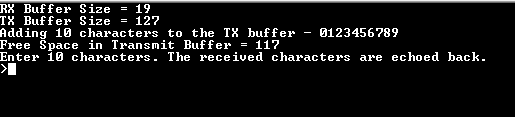
Console displays the initial transmit and receive buffer sizes
It then adds 10 characters - "0123456789" to the transmit buffer and displays the available free space in the transmit buffer after the 10 characters have been added
The message asks the user to enter 10 characters
NOTE: For this example, the "Free Space in Transmit Buffer = xx", where xx can be anything between 117 to 127, depending on the USART baud rate and the CPU execution speed
Enter 10 characters on the terminal
Entered characters are echoed back on the console and message is displayed indicating that the receive notification is turned on
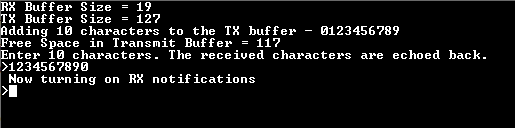
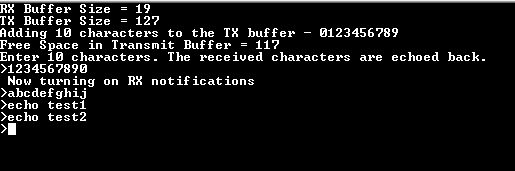
For every 10 characters typed, it will be echoed back on the console