1.4.3 CAN Bootloader Configurations
Bootloader Specific User Configurations
For devices with Dual Bank support and No Data Cache:
For devices with No Dual Bank support and Data Cache:
-
Bootloader Peripheral Used:
- Specifies the communication peripheral used by bootloader to receive the application
- The name of the peripheral will vary from device to device
-
Bootloader NVM Memory Used:
- Specifies the memory peripheral used by bootloader to perform Flash operations
- The name of the peripheral will vary from device to device
-
Bootloader Size (Bytes):
- Specifies the maximum size of Flash required by the bootloader
- This size is calculated based on Bootloader type and Memory used
- This size will vary from device to device and should always be aligned to device erase unit size
-
Enable Bootloader Trigger From Firmware:
-
This Option can be used to Force Trigger bootloader from application firmware after a soft reset. It does so by reserving the specified number of bytes in SRAM from the start of the RAM. The reserved memory is updated by the application with a pre-defined pattern. The bootloader firmware in the bootloader_Trigger() routine, can check the reserved memory for the pre-defined pattern and enter Bootloader mode if the pattern matches.
-
Number of Bytes to Reserve From Start of RAM:
- This option adds the provided offset to RAM Start address in bootloader linker script
- Application firmware can store some pattern in the reserved bytes region from RAM start for bootloader to check at reset in bootloader_Trigger() function
-
-
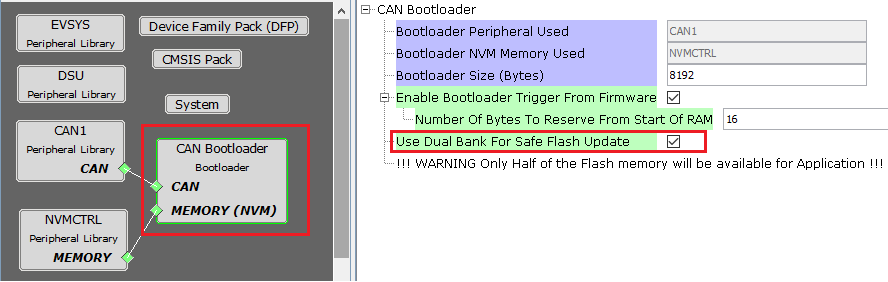
Use Dual Bank for Safe Flash Update:
- Used to configure bootloader to use Dual banks of device to upload the application
- This option is visible only for devices supporting Dual Flash banks
-
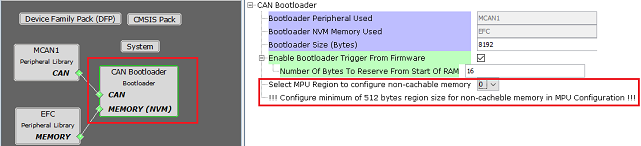
Select MPU Region to Configure Non-cacheable Memory:
-
Used to select the MPU region for which he SRAM has been configured as non-cahceable space
-
Configure the region selected above in MPU settings of MCC as shown in Bootloader MPU Configurations
-
A separate section will be created for this region in the custom linker script generated for bootloader
-
This option is visible only for devices which have Data cache
-
Bootloader Memory Protection Unit (MPU) Configurations
-
Open MPU settings from MCC>Tools option. Select Enable MPU.
-
Configure the region selected in Bootloader component as ram_nocache with other parameters as shown:

Bootloader Linker code for ram_nochache.
- For CAN bootloader below
xxx_message_ram section will be added to the custom linker file
generated:
- Note: xxx should be replaced with the CAN PLIB being used.
- Example: MCAN1
MEMORY { rom (rx) : ORIGIN = ROM_START, LENGTH = ROM_SIZE ram (rwx) : ORIGIN = RAM_START, LENGTH = RAM_SIZE /* The address mentioned here should match with address mentioned in MPU settings */ ram_nocache (RWX) : ORIGIN = 0x2045f000, LENGTH = (1 << (11 + 1)) } ... ... .mcan1_message_ram (NOLOAD): { . = ALIGN(4); _s_mcan1_message_ram = .; *(.mcan1_message_ram) . = ALIGN(4); _e_mcan1_message_ram = .; } > ram_nocache ... - CAN Bootloader will use this section
to allocate MCAN Message RAM configuration in contiguous non-cacheable
buffer
static uint8_t CACHE_ALIGN __attribute__((space(data), section (".mcan1_message_ram"))) mcan1MessageRAM[MCAN1_MESSAGE_RAM_CONFIG_SIZE];

/* Set MCAN1 Message RAM Configuration */
MCAN1_MessageRAMConfigSet(mcan1MessageRAM);
Bootloader System Configurations
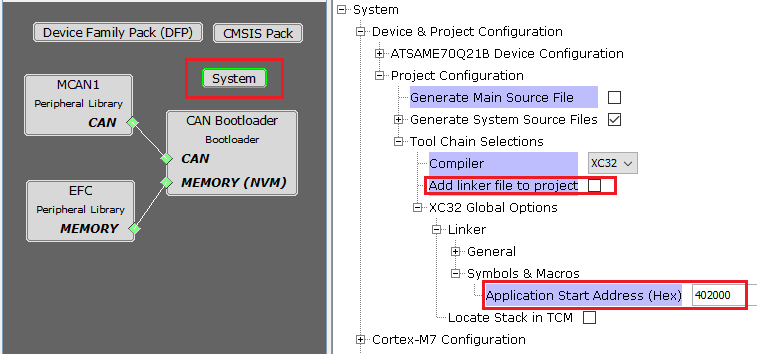
- Application Start Address (Hex):
- Start address of the application which will programmed by bootloader
- This value is filled by bootloader when its loaded which is equal to the bootloader size. It can be modified as per user need.
- This value will be used by bootloader to jump to application at device reset
-
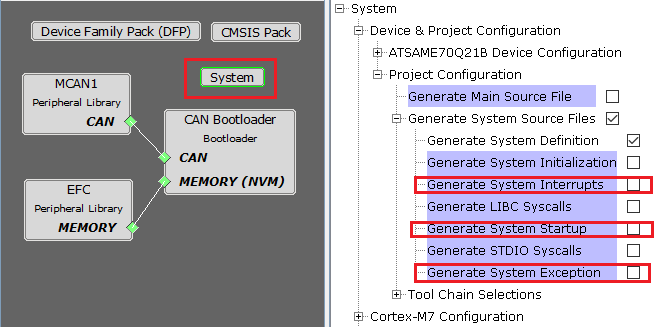
For optimizing the code Bootloader component disables generation of default interrupt and exception files as shown below
-
Enabling these interrupts explicitly may still not work as bootloader uses custom startup file which has its own Interrupt table populating only the reset handler
For MPUs (Microprocessors):
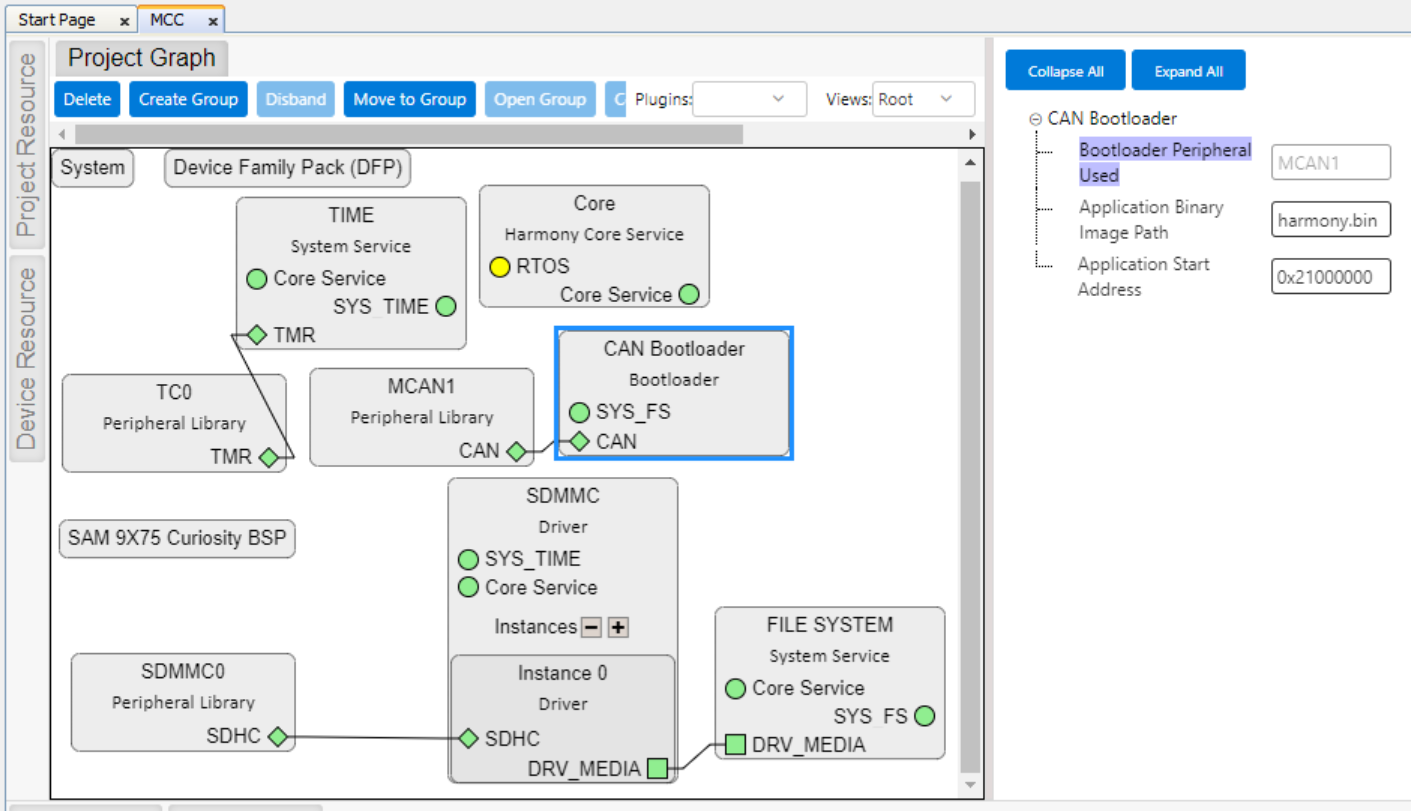
Bootloader Specific User Configurations
Bootloader with SD/eMMC media
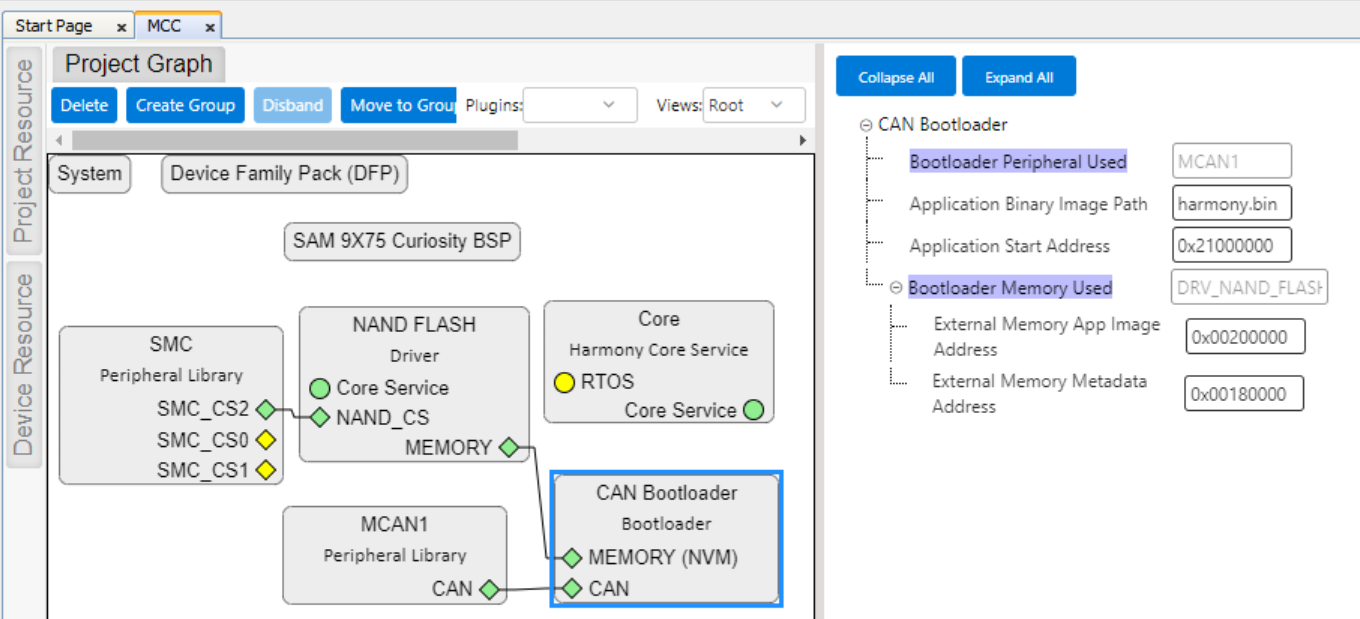
Bootloader with NAND Flash media
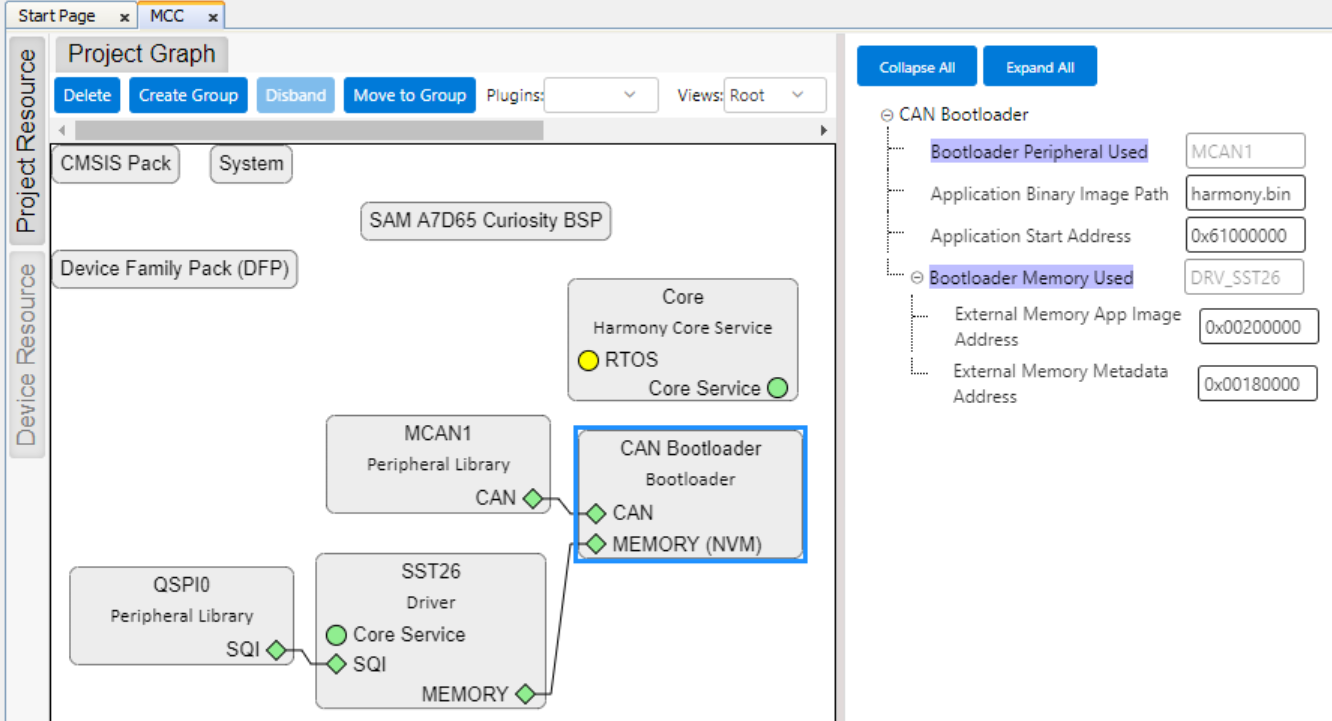
Bootloader with Serial Flash media
-
Bootloader Peripheral Used:
- Specifies the communication peripheral used by bootloader to receive the application
- The name of the peripheral will vary from device to device
-
Application Binary Image Path:
- Application binary image name harmony.bin (by default)
-
Application Start Address (Hex):
- Start address of the application on which bootloader will load and execute application
- This value will be used by bootloader to load and jump to application at device reset
-
Bootloader Memory Used (For Serial/NAND Flash):
- Specifies the Flash Driver used by bootloader to receive the application
- The name of the Flash Driver will vary from device to device
-
External Memory App Image Address (Hex) (For Serial/NAND Flash):
- External Memory App Image Address (0x00200000) on which bootloader will program the application image
- This value will also be used by bootloader to load the application from external memory to the DDR memory and execute it
-
External Memory Metadata Address (Hex) (For Serial/NAND Flash):
- External Memory Metadata Address (0x00180000) on which bootloader will program the size of application binary
- This value will be used by bootloader to read the application image from external memory
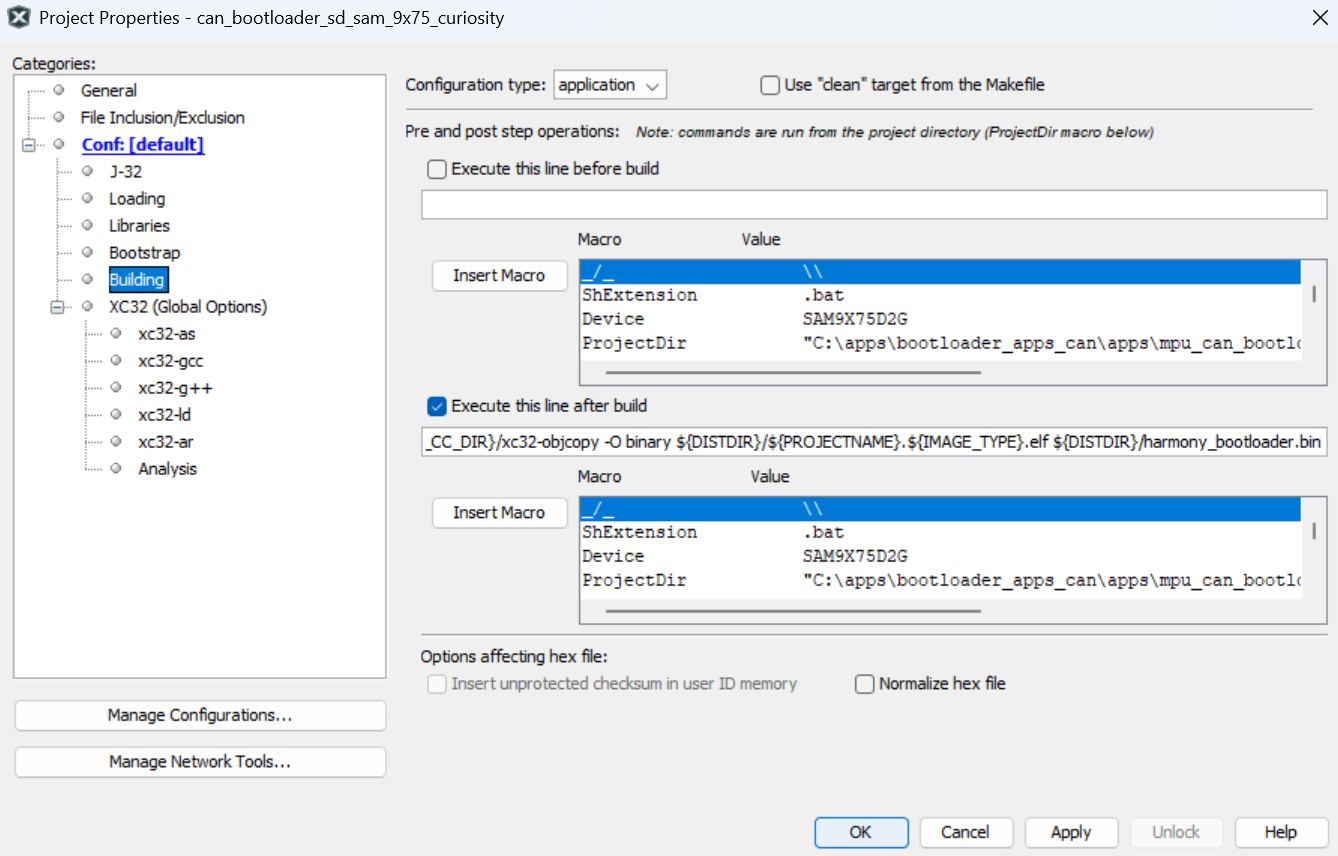
MPLAB X Settings (For MPUs)
- Specifying post build option to
automatically generate the Harmony 3 bootloader binary file from ELF file once the
build is
complete
${MP_CC_DIR}/xc32-objcopy -Obinary ${ImageDir}/${ConfName}.X.${IMAGE_TYPE}.elf ${ImageDir}/harmony_bootloader.bin