
38.6.1.1 Initialization
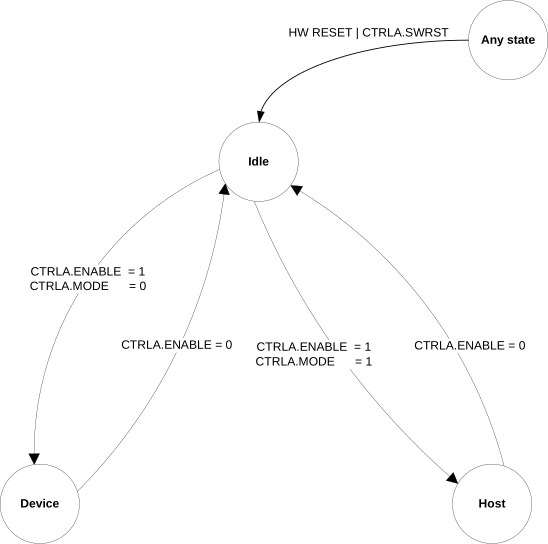
After a hardware reset, the USB is in the idle state. In this state:
- The module is disabled. The USB Enable bit in the Control A register (CTRLA.ENABLE) is reset.
- The module clock is stopped in order to minimize power consumption.
- The USB pad is in suspend mode.
- The internal states and registers of the device are reset.
Before using the USB, the Pad Calibration register (PADCAL) must be loaded with production calibration values from the NVM Software Calibration Area.
The USB is enabled by writing a '1' to CTRLA.ENABLE. The USB is disabled by writing a '0' to CTRLA.ENABLE.
The USB is reset by writing a '1' to the Software Reset bit in CTRLA (CTRLA.SWRST). All registers in the USB will be reset to their initial state, and the USB will be disabled. Refer to the Control A (CTRLA) register for details.
The user can configure pads and speed before enabling the USB by writing to the Operating Mode bit in the Control A register (CTRLA.MODE) and the Speed Configuration field in the Control B register (CTRLB.SPDCONF). These values are taken into account once the USB has been enabled by writing a '1' to CTRLA.ENABLE.
After writing a '1' to CTRLA.ENABLE, the USB enters device mode or host mode (according to CTRLA.MODE).
The USB can be disabled at any time by writing a '0' to CTRLA.ENABLE.
Refer to USB Device Operations for the basic operation of the device mode.