3.8.3.1 ATWINC1510 Firmware Upgrade
Description
The application's functioning requires the ATWINC1500 module to have firmware compatible with the Wi-Fi software stack running on the PIC32CMLS60 microcontroller (EV76R77A). To enable this compatibility, the ATWINC1500 module is updated with the firmware compatible with Wi-Fi software running in the latest released demo.
Running the Utility
- Connect the WINC1500-Xpro to EXT3 of the
PIC32CM LS60 Curiosity Pro (EV76R77A). Flash the
serial_bridge_ls60.hexinsideutilities/aws_iot_winc_provisioning_serial_bridge/hex.
Programming Hex File
- The pre-built hex file can be programmed
by following the below steps.
Steps to program the hex file
- Open MPLAB X IDE
- Close all existing projects in IDE, if any project is opened
- Go to
File>Import>Hex/ELF File - In the Import Image File window,
- Create Prebuilt Project,
- Click the Browse
button to select the prebuilt hex file in
aws_iot_provisioning_serial_bridge/hexfolder - Select Device as PIC32CM5164LS60100
- Ensure the proper tool is selected under Hardware Tool and click the Next button
- Click the Browse
button to select the prebuilt hex file in
- Select Project Name and
Folder,
- Select appropriate project name and folder and click the Finish button
- Create Prebuilt Project,
- In MPLAB X IDE, click the Make and Program Device button to program the device
- Follow the steps in Running the Demo section
- If LED0 (Green) lights up it indicates the WINC has the latest firmware, e.g., v.19.7.7. In case of RED LED indication go ahead with below steps.
- Download and extract pic32cmls60_aws_iot_winc_provisioning into utilities folder.
- Open command prompt and navigate to
utilities/pic32cmls60_aws_iot_winc_provisioning.The following command line will generate a device programming file winc1500_19.7.7.prog:
image_tool.exe -c winc1500_19.7.7/config.txt -o
              winc1500_19.7.7.prog -of prog
- The following command line will program a
WINC1500 device through the serial port:
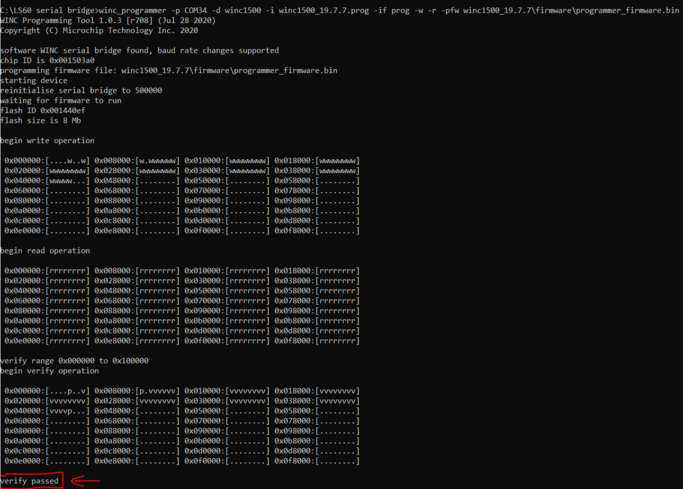
winc_programmer -p COMxx -d winc1500 -i
              winc1500_19.7.7.prog -if prog -w -r -pfw
              winc1500_19.7.7/firmware/programmer_firmware.bin
Note: Replace the xx with the device COM PORT in the above command and all other serial terminal application should be closed.
- Wait till
verify passedmessage comes up as shown below. After successful upgrade the Green LED (LED0) lights up.