The PIC32 WFI32E Curiosity Board can be powered using any of the following sources:
External 5V (J201)
PKOB3 micro-B USB (J302)
Target VBUS micro-B (J204)
Note: For the jumper connections, refer to the PIC32 WFI32E Curiosity Board User’s Guide (DS50003028).
The following table lists the power supply source details and its jumper positions.
Table 2-1. Power Supply Sources
Power Input
Description
Jumper Position (J202(1))
External 5V (J201(1))
Connect the Curiosity board to an external 5V power supply.
P/S-VIN (2-1)
PKOB3 micro-B USB (J302(1))
Connect the Type-A male to micro-B USB cable to the USB debug port for power supply.
PKOB-VIN (4-3)
Target VBUS micro-B (J204(1))
Connect the Type-A male to micro-B USB cable to the USB power port for power supply.
VBUS-VIN (6-5)
Note:
For the jumper connections, refer to the PIC32 WFI32E Curiosity Board User's Guide (DS50003028).
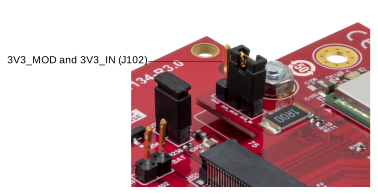
The following figure illustrates the jumper positions for powering the Curiosity board. Figure 2-1. Jumper Configuration for Power Input
Note: Ensure that the 3V3_MOD and 3V3_IN of J102 are connected on the WFI32E01PC/WFI32E03PC carrier board.
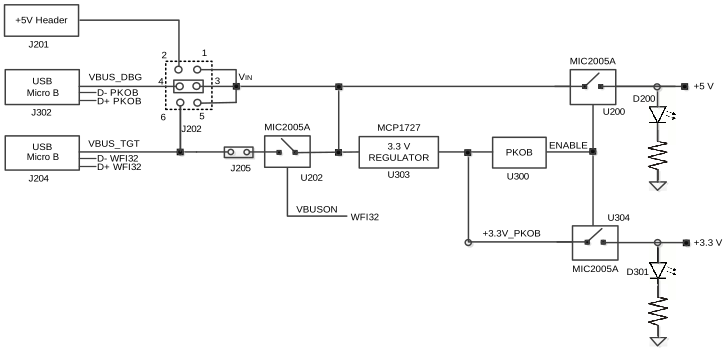
Use the J202 jumper to select the voltage source for the Curiosity board. The MCP1727 voltage regulator generates a +3.3V power supply for the MCU. Connect the PKOB debugger to a host PC. Turn on the power supply (+3.3V and +5V) to the Curiosity board via a power switch (MIC2005A) to drive the ENABLE signal to high.
Figure 2-2. Power Tree Diagram
DS50003034B
The online versions of the documents are provided as a courtesy. Verify all content and data in the device’s PDF documentation found on the device product page.