
4 Making a Standalone Debugger
This section outlines the procedure for using the Nano Debugger as a standalone debugger. If you are uncertain about this choice, refer to
4.1 Overview
When using a standalone debugger, the target device is located on a separate board from the debugger. As a result, the two boards operate on independent power domains, making level shifting essential for proper communication and electrical safety.
Because the target device is located on a separate board and may be replaced by the end user, the Nano Debugger only requires information about the physical interface(s) implemented for connection. For example, these interfaces may include AVR UPDI and/or Arm Cortex SWD. This allows the debugger to support one or more target device types as needed.
The block diagram below illustrates the key components involved in a standalone debugger configuration.
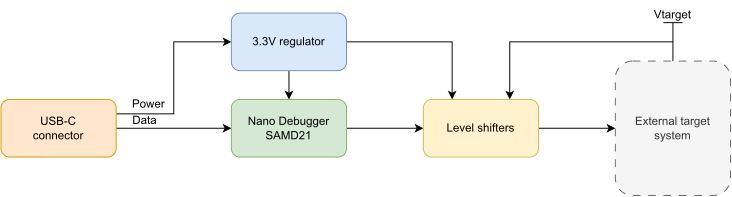
The USB-C connector supplies power to a fixed 3.3V regulator, which in turn powers the Nano Debugger. The target side of the level shifters is powered independently, and a reference voltage is provided for the Nano Debugger to monitor. The Nano Debugger does not control or influence the power supplied to the target side.
4.2 Hardware Design Procedure
Start your design process by consulting the schematic relevant to your board type. This schematic is provided as a PDF in the Appendix and is also available as an Altium project.
Review the detailed hardware description provided in this chapter. For each component within each subsystem, you may take one of the following actions:
- Use the exact component specified, or an alternative package variant of that component. These components are strongly recommended and have been validated by Microchip.
- Use a similar component, ensuring that its characteristics meet the requirements specified for the original component in the component lists. For active components, such as level shifters, the control pin functionality must be identical. Note that substituting a recommended component with an alternative may introduce risk to your design. Passive components are not fully specified and must comply with the ratings and grades indicated in the component tables.
- You may choose to omit the component entirely. However, components such as USB filtering and protection are important for meeting certification requirements in certain regions. Omitting these components or making significant design changes is done at your own risk and may impact product compliance and reliability.
The components specified in the reference schematic have been chosen to meet the temperature range of -40°C to +85°C.
For passive components such as resistors and capacitors, manufacturer part numbers (MPNs) are not provided. You may source these components according to your preferences, as long as they meet the specified ratings and ranges.
4.2.1 Common Hardware Description
This section applies to all board types that utilize the Nano Debugger.
USB Related
The Nano Debugger utilizes a SAMD21 microcontroller and functions as a USB full-speed device, supporting bit rates up to 12 Mb/s. A USB Type-C connector is recommended for optimal compatibility and performance, although other connector types may be considered based on specific design requirements.
A USB-C downstream device (sink) must connect both Configuration Channel lines (CC1 and CC2) to ground using 5.1kΩ resistors, while leaving the Sideband Use lines (SB1 and SB2) unconnected. For enhanced protection, it is strongly recommended to include ESD suppression diodes to safeguard the Nano Debugger against electrostatic discharge events.
| Function | Designator | Description | Manufacturer/MPN | Notes |
|---|---|---|---|---|
| USB connector | J100 | USB 2.0 type C receptacle | GCT USB4105-GF-A | Any suitable USB connector can be used as an alternative |
| CC1, CC2 line control | R108 | 5.1k, 1% | - | Mandatory for USB-C |
| R109 | 5.1k, 1% | - | ||
| ESD protection of the USB data lines | D101 | ESD suppressor | Littelfuse PGB1010402KR | Recommended for product certification |
| D102 | ESD suppressor | Littelfuse PGB1010402KR |
Power Supply
Multiple conditioning stages are necessary to operate the Nano Debugger at 3.3V, which is supplied from the USB VBUS.
USB VBUS typically ranges from 4.4V to 5.5V. When a USB cable is connected to the board, transient voltage events—such as voltage spikes from capacitive charging, inrush currents, and potential ESD pulses—can occur at the connector. These transients usually last from microseconds to milliseconds and may damage connected circuitry if not properly managed. The VBUS overvoltage protection circuit safeguards against voltages up to 20V and introduces a 4 ms startup delay. This combination protects the power supply from voltage spikes and provides the Nano Debugger with a soft start during connection.
- A current-limiting switch is implemented to protect the upstream computer and USB subsystem from overcurrent conditions that could damage the USB port or cause it to disconnect. This protection is particularly important in scenarios where end-users might connect peripheral hardware incorrectly, potentially resulting in excessive current draw—a frequent issue with development boards. The reference design's current limit can be adjusted by modifying the value of the associated resistor.
- A low dropout regulator (LDO) provides a stable 3.3V output by regulating the protected and filtered VBUS signal.
- USB overvoltage protection is strongly recommended, particularly for USB‑powered development kits, where boards may be exposed to ground loops caused by connecting oscilloscope probes. Such ground loops can be destructive to the power supply.
| Function | Designator | Description | Manufacturer/MPN | Notes |
|---|---|---|---|---|
| USB overvoltage protection | U101 | USB Positive Overvoltage Protection Controller | OnSemi NCP360SNAET1G | Highly recommended |
| C100 | 2.2 µF, 16V | - | ||
| C101 | 4.7 µF, 16V | - | ||
| VBUS current limiting | U102 | Adjustable current‑limiting power distribution switch | Microchip MIC2009A | Limits current to 507 mA - 877 mA |
| R100 | 300R, 1% | - | ||
| C103 | 4.7 µF, 16V | - | ||
| LDO regulator | U103 | Low quiescent current LDO | Microchip MCP1755/3.3V | Any suitable 3.3V regulator with high VIN tolerance can be used (for example, the MCP1755 has a 16V maximum VIN ) |
| C101 | 4.7 µF, 16V | - |
Nano Debugger MCU
The Nano Debugger utilizes a Microchip SAMD21 microcontroller. Use the components specified in this documentation or adhere to the recommended design guidelines for the SAMD21 MCU.
| Function | Designator | Description | Manufacturer/MPN | Notes |
|---|---|---|---|---|
| Debugger MCU | U100 | Nano Debugger | Microchip ATSAMD21E18A-AUT | |
| Decoupling capacitors | C104 | 0.1 µF, 16V | - | Mandatory decoupling capacitors for the MCU and core |
| C105 | 0.1 µF, 16V | - | ||
| C106 | 1 µF, 16V | - | ||
| Programming interface | J104 | 1.27 mm (50 mil) 2x5 | 20021111-00010T4LF | Any suitable connector mechanism can be used to program the MCU |
Miscellaneous
Additional subsystems utilized by the Nano Debugger include:
The Nano Debugger measures the target voltage using an ADC. A resistor divider is implemented to scale down the target voltage, which may exceed 3.3V, to a safe level for the ADC input. The resistor values are carefully selected to minimize current draw while ensuring the sampling capacitor charges properly. Using lower resistor values could risk current flowing into the Nano Debugger’s I/O pins if the target voltage is present while the Nano Debugger is unpowered.
The Nano Debugger uses a single LED in an active-low configuration to indicate its status to end users. If a different LED is selected, the series resistor value can be adjusted to modify the LED brightness as needed.
In the unlikely event of faulty debugger firmware, end users can short the BOOT jumper during power-up. This action forces the Nano Debugger into upgrade mode, enabling users to recover the device.
| Function | Designator | Description | Manufacturer/MPN | Notes |
|---|---|---|---|---|
| VBUS sampling | R101 | 47k, 1% | - | Mandatory. Enables the debugger to sample VBUS. |
| R102 | 47k, 1% | - | ||
| Target voltage sampling | R103 | 1M, 1% | - | Mandatory. Enables the debugger to sample target voltage. |
| R104 | 1M, 1% | - | ||
| Status LED | D100 | LED | Stanley VFHL1111C-4B23C-TR | Recommended for user feedback |
| R110 | 1k, 1% | - | ||
| Boot jumper | TP100 | pad/jumper | - | Mandatory - pad/jumper between PA27 of the MCU and GND for recovery |
| TP101 | pad/jumper | - |
4.2.2 Specific Hardware Description
These boards incorporate level shifters to isolate the Nano Debugger from external power domains, as indicated by a dotted line in the schematic. Additionally, appropriate connectors are necessary to interface with the target board.
Level-Shifters
The bidirectional and open-drain level shifters are used to interface with the programming and debugging interface on target devices. These signals are required and are described in
Two additional level shifters are necessary to enable the use of the Virtual Serial Port, as detailed in
| Function | Designator | Description | MPN | Notes |
|---|---|---|---|---|
| Level shifting | U104 | Single-Bit Dual-Supply Bus Transceiver | 74LVC1T45DW-7 | Any similar level shifter that operates from 1.65V to 5.5V |
| U105 | Single-Bit Dual-Supply Bus Transceiver | 74LVC1T45DW-7 | ||
| U106 | Single-Bit Dual-Supply Bus Transceiver | 74LVC1T45DW-7 | ||
| U107 | Single-Bit Dual-Supply Bus Transceiver | 74LVC1T45DW-7 | ||
| Open-drain reset driver | Q100 | N channel MOSFET | 2N7002E-7-F | Any suitable FET will do, as long as it is in an inverting configuration and has a defined state when the debugger is not powered |
| R105 | 1k, 1% | - | ||
| R106 | 47k, 1% | - | ||
| Current limiting resistors | R111 | 270R, 1% | - | Prevents excessive current flow into the level shifters and the target device if contention occurs |
| R112 | 270R, 1% | - | ||
| R113 | 270R, 1% | - | ||
| R114 | 270R, 1% | - |
Connectors
The Nano Debugger’s level shifters interface with the programming, debugging, and I/O pins of target devices. The reference schematic includes three connectors:
| Designator | Standard Target Type | Reference Format |
|---|---|---|
| J101 | Arm Cortex standard header | 2x5 - 1.27 mm-pitch header |
| J102 | AVR UPDI (½ of 8-pin Single-Inline header) | 1x4 - 2.54 mm-pitch header |
| J103 | CDC Serial port RX/TX | 1x2 - 2.54 mm-pitch header |
There is no standard header type specified, so the choice of header is left to your discretion based on your application requirements.
To use the CDC independently, both a voltage reference and ground (GND) must be connected to the target device.
4.3 Default Firmware Image
When using the default firmware image, the board configuration supports the feature set listed below. If you wish to create a standalone debugger with additional features enabled, an extra manufacturing step is required to configure the Nano Debugger accordingly. See Optional: Debugger Configuration.
| Feature | Default |
|---|---|
| Programming/Debug Interfaces | Arm SWD and AVR UPDI interfaces |
| Device | Device not specified (blank) |
| Power | Level shifters are present. No adjustable regulator is included (the debugger cannot adjust the target voltage). Target voltage measurement is supported (the debugger can measure the target voltage). |
| Voltage | Operating range: 1.6V to 5.5V |
| Serial number | Automatic USB serial number generation |
| Auxiliary interfaces | Virtual Serial Port/CDC. No DGI GPIO channel. No ID SYSTEM channel. |
| Kit name string | Microchip Nano Debugger |
| Manufacture name string | Microchip |