
14.16.6 User OTP Memory Window
Note: Only certain dsPIC devices have User OTP Memory. Check your
device data sheet.
User OTP space is available for permanent storage of application specific data.
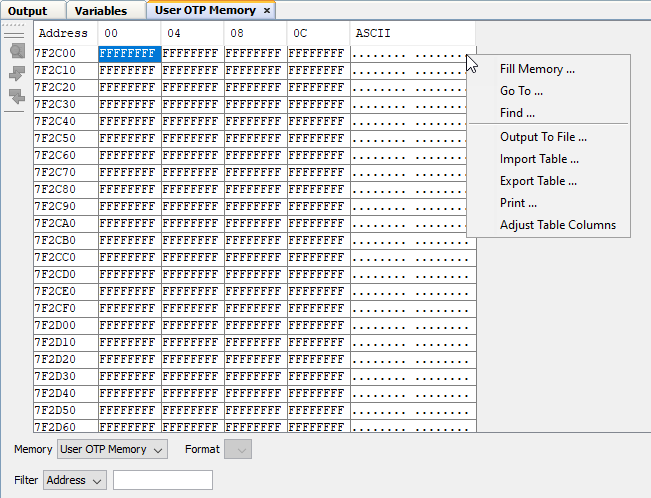
User OTP Memory Window Display
Consult your device programming specification to determine what values may be entered here.
In the display, data is shown in the following columns.
- Address – Hexadecimal address of the data in the next column.
- Data Blocks – Hexadecimal data, shown in 1- or 2-byte blocks.
- ASCII – ASCII representation of the corresponding line of da
User OTP Memory Window Icon
Icons are located on the left side of the window.
| Icon | Icon Text | Function |
|---|---|---|
 | Find | Specify a string to find in the window. Select to match whole word or case. |
 | Find Next | Find next instance of string from Find. |
 | Find Previous | Find previous instance of string from Find. |
User OTP Memory Window Menu
Right click in the memory window data area to pop up the menu, as in the table below.
| Item | Description |
|---|---|
| Fill Memory | Fill memory from Start Address to End Address with the value in Data. Specify other options in the Fill Memory dialog. |
| Go To | Go to the address/function specified using the Go To dialog. |
| Find | Find text specified using the Find dialog. |
| Output To File | Write the displayed window contents to a text file using the Output to File dialog. |
| Import Table | Hex,
Dual Port or XY Data Formats Only Import tabular data from a file into a Memory window using the Import Table dialog. |
| Export Table | Hex,
Dual Port or XY Data Formats Only Export tabular data from a Memory window into a file using the Export Table dialog. |
| Print the
contents of this window using the Print
dialog. Note: If
you have a large memory device, the number of pages printed can
become very large. A suggestion is to print the window contents
to a file (Print dialog,
General tab, Print to
File check box) and then select which pages from
the file you need to print. | |
| Adjust Table Columns | Adjust the columns automatically. |