
1.2.3.3 Configuring the Library
Command System Service Library should be configured via MCC. The following figures show the MCC configuration window for Command System Service and brief description.
The Command Processor is dependent on the services provided by the console system which in turn depends on the UART PLIB or USB CDC function driver.
Command System Service connected to UART based console:

Command System Service connected to USB based console:

Configuration Options
Device Used:
Indicates the console instance that the Debug System Service will use
Command Print Buffer Size (512-8192):
Indicates the size of the command print buffer in bytes
Maximum Command Groups:
Specifies the maximum command groups to be used
Maximum Arguments Per Command:
Specifies the maximum number of arguments per command
RTOS Settings:
Stack Size (in bytes):
Specifies the number of bytes to be allocated on the stack for the System Command task
Task Priority:
Specifies priority for the System Command task thread. The value can vary based on RTOS used
Use Task Delay?
When enabled the System Command task will be scheduled out voluntarily after every run based on the delay configured
Task Delay (ms):
Indicates the amount of time for which the System Command RTOS thread is put in blocked state by the scheduler before it is run again
RTOS Settings For Micrium OS-III RTOS
Below additional options are visible in system commands RTOS settings when the Micrium OS-III is added into project graph.
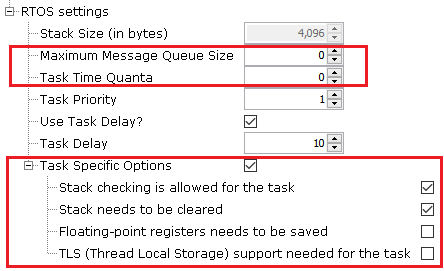
Maximum Message Queue Size:
This argument specifies the maximum number of messages that the task can receive through internal message queue
A Micrium OS-III task contains an optional internal message queue (if OS_CFG_TASK_Q_EN is set to DEF_ENABLED in os_cfg.h)
The user may specify that the task is unable to receive messages by setting this argument to 0
Task Time Quanta:
The amount of time (in clock ticks) for the time quanta when Round Robin is enabled
If the user specifies 0, then the default time quanta will be used which is the tick rate divided by 10
Task Specific Options:
Contains task-specific options. Each option consists of one bit. The option is selected when the bit is set.
The current version of Micrium OS-III supports the following options:
Stack checking is allowed for the task:
Specifies whether stack checking is allowed for the task
Stack needs to be cleared:
Specifies whether the stack needs to be cleared
Floating-point registers needs to be saved:
Specifies whether floating-point registers are saved
This option is only valid if the processor has floating-point hardware and the processor-specific code saves the floating-point registers
TLS (Thread Local Storage) support needed for the task:
If the caller does not want or need TLS support for the task being created.
If the user does not include this option, TLS will be supported by default. TLS support was added in V3.03.00.