
2.6.8 Code Generation
The generated file and folder structure varies between MCC Melody and Harmony, as well as between MPLAB X IDE and MPLAB Tools for VS Code.
MPLAB® X IDE
- MCC Melody generates source and
header files inside a folder named
mcc_generated_files, located within the project folder

- MCC Harmony generates source and
header files inside a folder named
src, which is located outside the main project folder

Note: MCC Harmony warns users if it detects an existing
src folder outside the project folder. If this src
folder belongs to a different Harmony project, move the current project folder to a
different directory before generating code.src Folder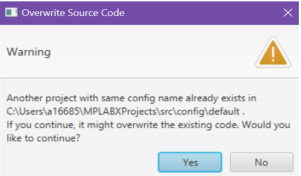
MPLAB® Tools for VS Code®
Inside the project folder, MCC generates a folder named after the MCC configuration
(for example, My_MCC_Config), which contains another folder named
mcc. The structure of the contents within the MCC configuration
folder differs between MCC Melody and MCC Harmony.
- MCC Melody generates both the
mcc_generated_filesfolder and the MCC configuration metadata inside themccfolder

- MCC Harmony generates the
srcfolder inside the MCC configuration folder (for example,My_MCC_Config) and places the configuration metadata inside themccfolder
