To use the Flash software, program one of the provided EEPROM files
(./eeprom_config/eep_zwave_al.hex or
./eeprom_config/eep_zwave_ fl.hex) . Use the ATA8510 Configuration Tool to do any changes in the EEPROM
configuration.
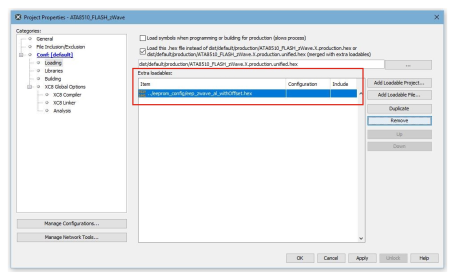
In the delivered MPLAB X IDE project file, the EEPROM is programmed in addition to the Flash
when the device is programmed. This is configured via ‘Extra loadables’ in the Project
Properties.Figure 4-1. Project Properties – Loading
Do not use the hex-file export of the ATA8510 Configuration
Tool directly as loadable because an offset to the EEPROM location needs to be added.
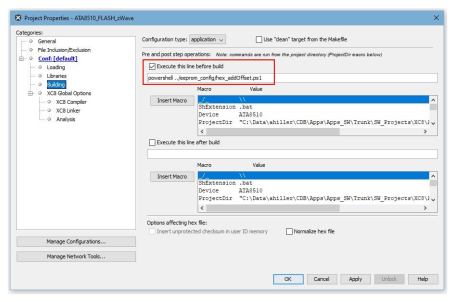
Therefore, a powershell script is called as a pre-build step (Project Properties/Conf:
[default]/Building) to add the offset to the .hex file.Figure 4-2. Project Properties – Building
The online versions of the documents are provided as a courtesy. Verify all content and data in the device’s PDF documentation found on the device product page.