
2 Introduction
(Ask a Question)The Brush Less DC (BLDC) estimator computes the rotor position based on motor parameters, voltage, and current values. The block also estimates motor speed. The algorithm is based on back-emf estimation and filtering. The motor parameters Rs, Ls, and sampling time Ts are used to build motor model. The voltages that are fed to the actual motor are fed to the motor model along with motor currents and are used to compute back-emf. A Phase-Locked Loop (PLL) structure is used to find the angle of filtered back emf which is, aligned to rotor electrical position.
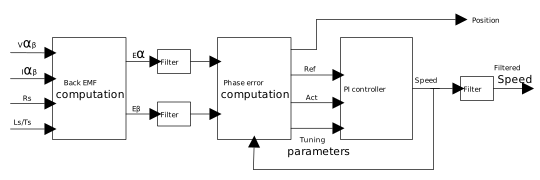
The motor can accelerate or decelerate rapidly, in this case the rate of change of rotor position has to be dynamically and accurately tracked by the PLL. This is achieved by proper tuning of the PI controller that is part of the PLL.
The PLL block uses the theta_factor_i input to scale the speed used in computing the rotor angle. This value is computed as:
where,
Nrpm is rated motor speed in RPM
Npp is number of pole pairs
fsw is switching frequency
Summary
(Ask a Question)The following table provides a summary of the BLDC estimator characteristics.
| Core Version | This document applies to BLDC estimator v4.3. |
| Supported Device Families |
|
| Supported Tool Flow | Requires Libero® SoC v11.8 or later releases. |
| Licensing | Complete encrypted RTL code is provided for the core, enabling the core to be instantiated with SmartDesign. Simulation, Synthesis, and Layout are performed with Libero software. BLDC Estimator is licensed with encrypted RTL that must be purchased separately. For more information, see BLDC Estimator. |
Features
(Ask a Question)BLDC estimator has the following key features:
- Computes the exact position of the rotor
- During rapid accelerations and decelerations, the rotor position is dynamically tracked using PLL
Implementation of IP Core in Libero Design Suite
(Ask a Question)IP core must be installed to the IP Catalog of the Libero SoC software. This is done automatically through the IP Catalog update function in the Libero SoC software, or the IP core is manually downloaded from the catalog. Once the IP core is installed in the Libero SoC software IP Catalog, the core is configured, generated, and instantiated within the SmartDesign tool for inclusion in the Libero project list.