
2.2.2 Configure EEPROM Size
Check and select the required EEPROM size via fuse NVMCTRL_EEPROM_SIZE before using the
SAM C21 microcontroller board. Follow these instructions to configure the EEPROM size:
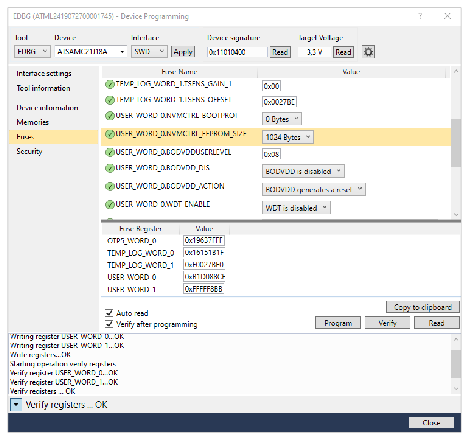
- In Microchip Studio, go to the Tools tab to open the programming dialog, then select Device Programming or press <Ctrl> + <Shift> + <P>.
- In the Device Programming window, select the corresponding EDBG, then click Apply.
- In the Device Signature section, click Read to ensure a successful connection.
- Go to the Fuses tab to locate and select the USER_WORD_0.NVMCTRL_EEPROM_SIZE fuse.
- Select 1024 Bytes in the “EEPROM value” drop-down list.
- Click Program to store the fuse settings to the SAM C21 microcontroller.
- Wait until the programming and verifying are complete.
Note: Check and set the EEPROM size fuse for each board participating
in the UWB demonstration.