
2.2.3 Program Demonstration Firmware
The UWB distance measurement requires two SAM C21 Xplained Pro Boards: one programmed as
Verifier and the other as Prover (see Status Bar). The associated
Flash files are located in the installation subdirectory SAMC 21. Follow these
instructions to program the SAM C21 μC microcontroller with the associated demonstration
firmware:
- In Microchip Studio, go to the Tools tab, then select Device Programming or press <Ctrl> + <Shift> + <P>.
- In the Device Programming window, select the corresponding EDBG, then click Apply.
- In the Device Signature section, click Read to ensure a successful connection.
- In the Device Programming window,
go to the Memories tab, then browse the
.hexfile (see the following figure). Select the Verifier Flash.hexfile from the drop-down list or browse the file destination. - Select “Erase Flash before programming”, then click Program to download the Flash file to SAMC21J18A microcontroller.
- Wait until the programming and verifying are complete.
- Repeat the sequence to program
the Prover demonstration firmware.
Figure 2-4. Programming the Demonstration Firmware 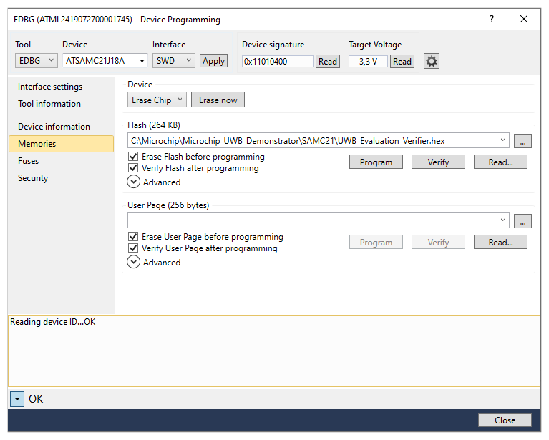
Note: After programming the demonstration firmware, the user must set
up the UWB parameter settings; otherwise, no valid measurement will be performed. For
more details, refer to Parameter Settings.