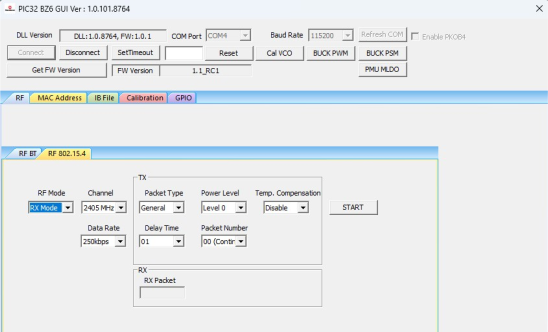
Perform the following steps for the demonstration of the 802.15.4 RX mode:
Set up the connection between the
PIC32-BZ6 Curiosity Board and PC. For more
details, refer to Getting Started with MCHPRT3.
In the RF 802.15.4 tab, perform the following steps:
From the “RF Modes”
drop-down list, select RX Mode.
From the “Channel”
drop-down list, select 2405 MHz for channel 11.
From the “RX Data Rate”
drop-down list, select Data Rate (250K, 500K, 1M and 2M), for
example, select 250K.
Click START to receive the
802.15.4 packet. The total number of received
packets are available under the “RX Packet” drop-down list.
Figure 4-14. MCHPRT3PIC32-BZ6 GUI for 802.15.4 RF RX Mode Demonstration
DS50004106B
The online versions of the documents are provided as a courtesy. Verify all content and data in the device’s PDF documentation found on the device product page.