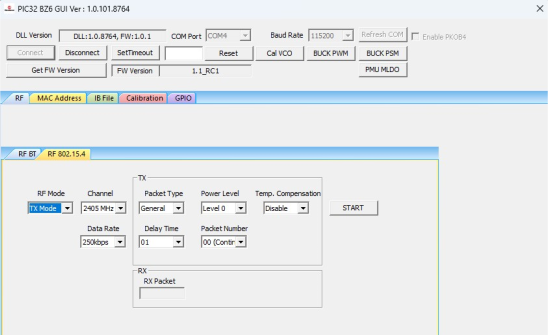
Perform the following steps for the demonstration of the 802.15.4 packet transmission:
Set up the connection between the
PIC32-BZ6 Curiosity Board and PC. For more
details, refer to Getting Started with MCHPRT3.
In the RF 802.15.4 tab, perform the following steps:
From the “RF Modes”
drop-down list, select TX Mode.
From the “Channel”
drop-down list, select 2405 MHz for channel 11.
From the “Packet Type”
drop-down list, select Packet Type as General (default
value) or Smallest.
From the “Power Level”
drop-down list, select Level 0.
Note: Level
0: The device transmits uncalibrated maximum transmit power, meaning
the output power can vary between devices. This Level 0 is provided
only for testing purpose. For calibrated power levels, see Table 4-1.
From the “Delay Time”
drop-down list, select the Packet Delay Time (00-250) (the
default value is 10).
From the “Packet Number”
drop-down list, select the Number of Transmitting Packet (00-250)
(the default value is 00, Continuous Packet Transmission).
From the “Temp.
Compensation” drop-down list, select Enable or Disable.
The output power compensation according to the ambient temperature.
Click START to transmit the 802.15.4 packet.
Note: The “Data Rate” must be set at 250 Kbps,
and the “Delay Time” must be 01 for the standard 802.15.4 packet stream.
Figure 4-13. MCHPRT3PIC32-BZ6 GUI for 802.15.4 RF TX Modulation Test Demonstration
Table 4-1. IEEE® 802.15.4 Target Transmit Power Levels
Technology
Classification
Power Setting
Target Power (dBm)(1)
Remark
802.15.4
Uncalibrated power control
Level 0
11
Maximum power transmission
Calibrated power control
Level 1
11
—
Level 2
10
⋮
⋮
Level 7
5
⋮
⋮
Level 12
0
⋮
⋮
Level 14
-2
Level 15
-3
Note:
Target power includes the power tolerance over power
control methodology.
DS50004106B
The online versions of the documents are provided as a courtesy. Verify all content and data in the device’s PDF documentation found on the device product page.