This chapter describes how to assemble the transmitter and receiver hardware using the
ATA8510-EK1 kit components.
For testing, use the hardware from the ATA8510-EK1
application demo. This demo is based on:
ATA5831 Xplained Pro (ATA5831-XPRO)
(EV14T68A) connected to an ATSAMC21-XPRO evaluation kit and ATAB8510B-V2.0 remote sensor board (EV77V90A).
In the range testing demo:
The ATA5831-XPRO acts as the transmitter board to ensure a stable power
supply.
The ATAB8510B-V2.0 remote sensor board acts as a mobile receiver as it is
battery-powered.
Transmitter Setup
The following steps outline the physical assembly process for the transmitter
hardware:
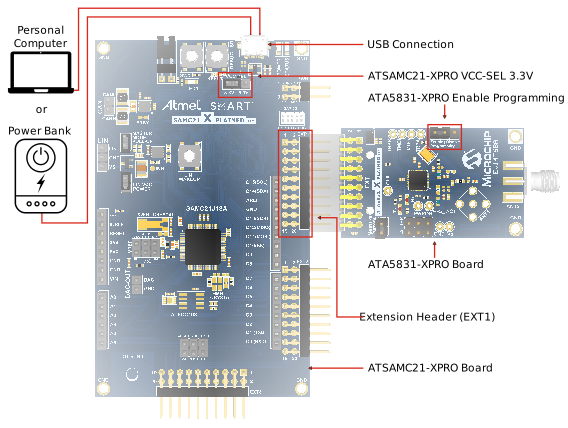
Connect the ATA5831-XPRO board to the Extension Header 1
(EXT1) on the ATSAMC21-XPRO.
Connect the ATSAMC21-XPRO board via
Universal Serial Bus (USB) to a Personal Computer (PC) or a power bank.
Set the ATSAMC21-XPRO board power selection
jumper to 3.3V.
Ensure the ATSAMC21-XPRO board programming
jumper is set to Enable.
Connect a suitable antenna to
the ATA5831-XPRO board.
Figure 4-1. ATSAMC21-XPRO Board and ATA5831-XPRO Board Transmitter Setup
Receiver Setup
The ATAB8510B-V2.0 remote sensor board serves as the
basis for the receiver hardware, designed for battery-powered operation. In this
setup, the board functions as a mobile receiver and a 3V coin cell battery mounted
on the bottom of the board powers it. Once the user inserts the battery and
configures the EEPROM, the receiver becomes ready for operation without any
additional cabling or configuration.
The following steps describe how to set up the receiver hardware:
Turn the ATAB8510B-V2.0 remote sensor board over to
access the battery holder on the back.
Insert a 3V CR2032 coin cell battery into the battery holder, ensuring
correct polarity as marked.
Verify that the battery is firmly seated to establish proper electrical
contact.
DS70005658A
The online versions of the documents are provided as a courtesy. Verify all content and data in the device’s PDF documentation found on the device product page.