
6 Summary of the Configuration
This chapter consolidates the different configuration steps to create a working range
test application. The following table provides all modifications required for Receiver
and Transmitter modes, based on the default EEPROM configuration.
| Tab | Section | Action |
|---|---|---|
| System Init | Watchdog timer | Enable the watchdog timer and set the watchdog enable timeout to 2.1s. |
| System Init | Operation mode after system start |
Operation mode = RXMode Enable path A |
| Services (2) | ID check | Enable ID check |
| Services (2) | ID check configuration |
Number of enabled IDs = 1 ID Byte 0 = 0x12 0x34 0x56 0x78 |
| Events | Path A | Disable all events and enable ID check OK in section path A. |
The following figures illustrate the required configurations:
- Under “Watchdog Timer” field,
perform the following steps:
- Check Watchdog Enable.
- From the “Timeout” drop-down list, set the value to 2.1s.
Figure 6-1. Watchdog Enable 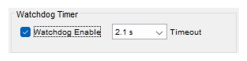
- Under “Operation Mode after
System Start” field, perform the following steps:
- From the “Operation Mode” drop-down list, select RXMode.
- From “IDLEMode” drop-down list, select XTO.
- Check VCO Tuning.
- Check Enable Path A.
Figure 6-2. Operation Mode After System Start 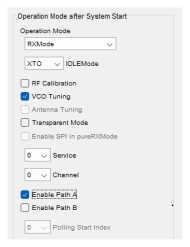
- Under “ID Check” field, check
ID Check Enable.
Figure 6-3. Enabling ID Check 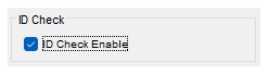
- Under “ID Check Configuration” field, perform the following steps:
- From the “Number of Enabled IDs” drop-down list, set the value 1.
- In the “ID Byte 0” field, set the value to 0x12 0x34 0x56 0x78.
- From the “Offset” drop-down list, set the value to 0.
- From the “Length” drop-down list, set the value to 4.
Figure 6-4. ID Check Configuration 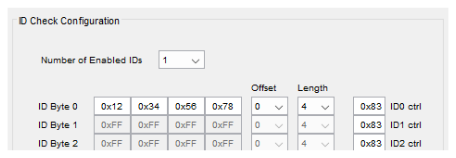
- Under “Path A” field, check ID
Check OK (IDCHKA).
Figure 6-5. Path A – Enabling ID Check OK (IDCHKA) 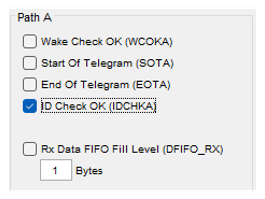
Note: The user must ensure to disable all other
events.