This chapter explains how to run the test, what actions the user needs to take, and how
to interpret the receiver indication to determine successful reception at a specific
distance.
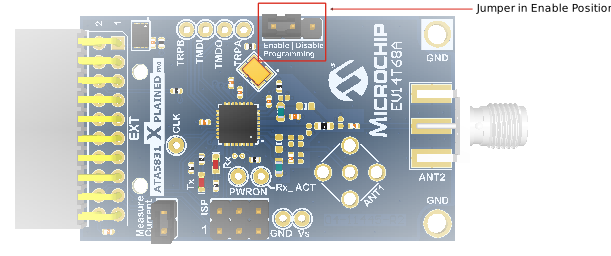
Place the transmitter (ATA5831-XPRO board (EV14T68A)) at a fixed location.
Apply a constant wake source, for example, via the programming enable
jumper.
Figure 7-1. Enable/Disable Programming
Jumper
The power supply is available through the ATSAMC21-XPRO
board (Supply Voltage (VS) = 3.3V). After completing the setup, the transmitter
transmits a Radio Frequency (RF) message approximately every 2.1s. The LED activates
periodically to indicate the operation and timing of these transmissions.
The receiver board is mobile. Walk around with it, then press a button and monitor the
LED:
If the LED turns ON for around
two seconds, the hardware successfully receives the message.
If there is no reaction, the
distance between transmitter and receiver is out of range.
Note: The LED briefly flashes with the button press (event)
to indicate the successful start of the Receive mode.
Note: The system is asynchronous. The activation of the LED
can take up to two seconds because of the repetition rate implemented in the
transmitter.
End-to-End Transmitter and
Receiver Sequence
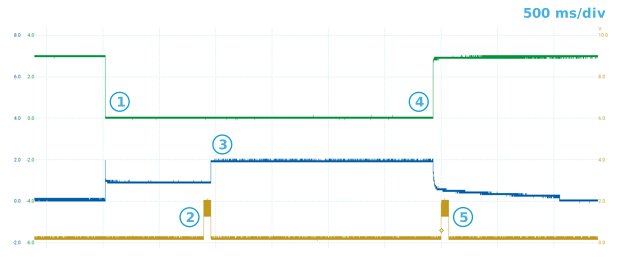
This section summarizes the intended timing relationship between receiver wake-up,
periodic transmitter messages, and the reception indication. The following figure
illustrates end-to-end flow of the transmitter and receiver sequence.Figure 7-2. Transmitter and Receiver Sequence
The following steps outlines the end-to-end transmitter and receiver sequence:
The button push triggers the
NPWRON event to wake the receiver.
The transmitter triggers the
RF message.
The LED activates to indicate
successful reception of the expected pattern.
Turn the receiver OFF because
no valid wake source is available (because the button is no longer
pressed).
Start the next cycle
(periodic transmission).
Note: The user can achieve more advanced settings with higher
repetition rates with limited effort. For assistance with any other range test
implementation, go to the Microchip Technical Support Portal or
contact local Microchip Sales office.
DS70005658A
The online versions of the documents are provided as a courtesy. Verify all content and data in the device’s PDF documentation found on the device product page.