
3.9.4.2.3 Ring LED Example Application on PIC32CM LS00 Curiosity Nano + Touch Evaluation Kit
Description
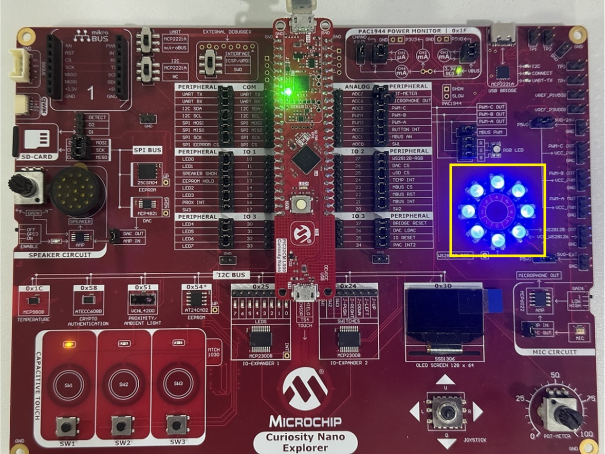
This application demonstrates how to control a ring WS2812B RGB LED on Curiosity Nano Explorer board using Pulse Width Modulation (PWM) with Direct Memory Access (DMA) for efficient LED timing management. The ring follows a sequential pattern, cycling through green, red, blue, and white to produce a continuous color transition, controlled by the PIC32CM LS00 Curiosity Nano + Touch evaluation kit.
Modules/Technology Used
- Peripheral Modules
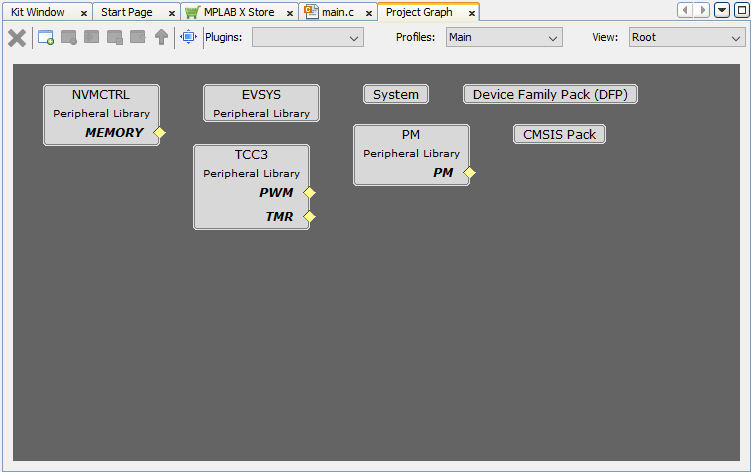
- TCC3
- SYSTICK
- DMA (DMAC)
- PM
- EVSYS
- NVMCTRL
Hardware Used
Software/Tools Used
Refer to the Project Manifest present in harmony-manifest-success.yml under
the project folder
pic32cm_ls00_cnano_ring_led/firmware/src/config/pic32cm_ls00_cnano.
- Refer to the Release Notes to know the MPLAB X IDE and MCC Plug-in version
Due to Microchip regularly updates tools, occasionally issue(s) could be discovered while using the newer versions of the tools. If the project does not seem to work and version incompatibility is suspected, it is recommended to double-check and use the same versions that the project was tested with. To download original version of MPLAB Harmony v3 packages, refer to the document How to Use the MPLAB Harmony v3 Project Manifest Feature (DS90003305).
Setup
- Connect the PIC32CM LS00 Curiosity
Nano + Touch evaluation kit to the host PC using a Type-A male to micro-B USB cable.
Plug the cable into the Micro-B USB (Debug USB) port on the evaluation kit

Programming Hex File
The pre-built hex file can be programmed by following the below steps.
- Open MPLAB X IDE
- Close all existing projects in IDE, if any project is opened
- Go to
File>Import>Hex/ELF File - In the Import Image File window,
- Create Prebuilt Project,
- Click the Browse button to select the prebuilt hex file
- Select Device as PIC32CM5164LS00048
- Ensure the proper tool is selected under Hardware Tool and click the Next button
- Select Project Name and Folder,
- Select appropriate project name and folder and click the Finish button
- Create Prebuilt Project,
- In MPLAB X IDE, click the Make and Program Device button to program the device
- Follow the steps in Running the Demo section below
Programming/Debugging Application Project
- Open the project
(
pic32cm_ls00_cnano_ring_led/firmware/ring_led_pic32cm_ls00_cnanogroup) in MPLAB X IDE - Ensure
PIC32CM LS00 Curiosity
                Nano
is selected as hardware tool to program/debug the application - Build the code and program the device by clicking on the Make and Program button in MPLAB X IDE tool bar
- Follow the steps in Running the Demo section below
Running the Demo
- A WS2812B RGB LED ring cycles through
green, red, blue, and white, changing colors every 1 second
Comments
- Reference Training Module: Arm TrustZone Getting Started Application on PIC32CM LS60 (Arm Cortex-M23) MCUs
- This application demo builds and
works out of box by following the instructions in Running the Demo section. If the
user needs to enhance/customize this application demo, should use the MPLAB Harmony v3
Software framework. Refer to the following links to setup and build the applications
using MPLAB Harmony.
- How to Setup MPLAB Harmony v3 Software Development Framework (DS90003232)
- How to Build an Application by Adding a New PLIB, Driver, or Middleware to an Existing MPLAB Harmony v3 Project (DS90003253)
- How to Set up the Tools Required to Get Started with MPLAB® Harmony v3 and MCC
- Create a new MPLAB Harmony v3 project using MCC
- Update and Configure an Existing MHC-based MPLAB Harmony v3 Project to MCC-based Project