1 Complete the Secure Exchange Questionnaire

  1. Launch the Trust Platform Design Suite.
  2. Navigate to the Secure Exchange Process tab.
    Figure 1-1. TPDS Secure Exchange Process Tab
  3. Under Solution:
    1. Select the secure IC (e.g., ATECC608)
    2. Select the provisioning flow (TrustFLEX or TrustCUSTOM)
    3. Select the package (e.g., SOIC-8)
    4. Select the communication protocol (e.g., I2C)
      Figure 1-2. Questionnaire Solution Section
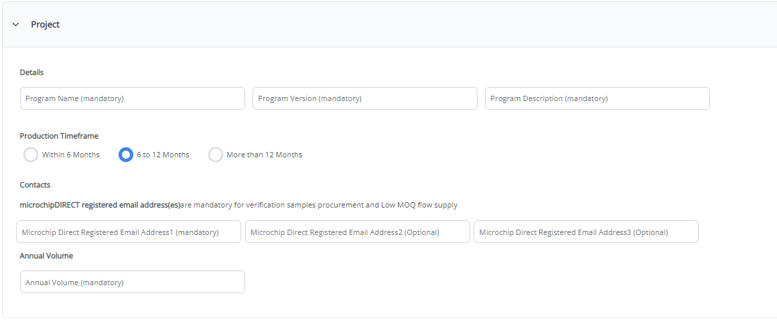
  4. Under Project:
    1. Enter the Program Name
    2. Enter the Program Version
    3. Provide a Program Description
    4. Specify the production timeframe
    5. Provide one to three MicrochipDIRECT-registered email addresses
      Figure 1-3. Questionnaire Project Section
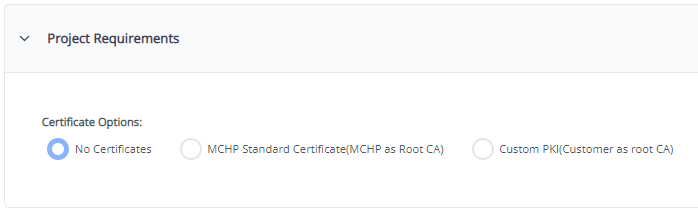
  5. Under Project Requirements (optional):
    1. Indicate whether a custom PKI is required
    2. Indicate whether WPC Qi 1.3 provisioning is required
      Figure 1-4. Questionnaire Project Requirement Section
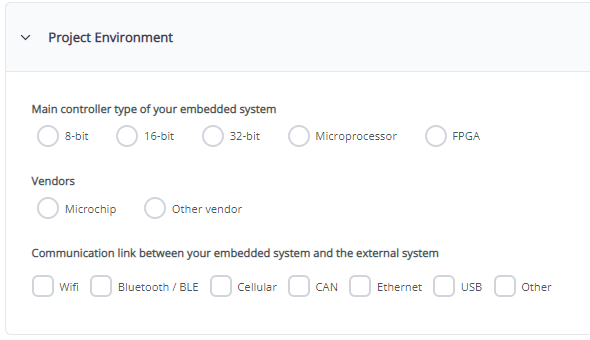
  6. Under Project Environment:
    1. Select the main controller type
    2. Identify controller vendors
    3. Specify communication link (embedded system ↔ external system)
      Figure 1-5. Questionnaire Project Environment Section
  7. Select Save User Data.
    1. This action downloads the completed Secure Exchange Questionnaire file
      Figure 1-6. Download Success Message