
1 Features and Pinout
1.2 Pinout
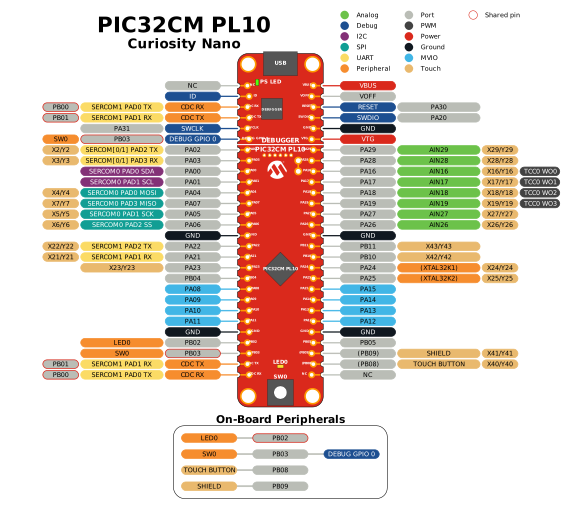
PIC32CM PL10 Curiosity Nano pinout diagram.
All the PIC32CM6408PL10048 I/O pins are accessible at the edge connectors on the board. The image below shows the board's pinout.
1.3 Board Features
Features of Curiosity Nano, board layout picture, board block diagram, and Curiosity Nano pinout standard.
1.3.1 Board Features
- PIC32CM6408PL10048 Microcontroller
- On-Board Nano Debugger
- Programming and debugging
- Virtual serial port via USB CDC
- Green power and status LED
- One debug GPIO channel (DGI GPIO)
- Board identification in Microchip development environments
- Power and Connectivity
- USB Type-C® for power and data
- Adjustable target voltage (1.8–5.5V, up to 500 mA) controlled by the on-board debugger
- 1x2 100 mil header for alternative VDDIO2 supply
- Hardware Peripherals
- Yellow user LED
- Mechanical user switch
- Touch button
- 32.768 kHz Crystal
- Curiosity Nano Edge Connector
- Sockets into Curiosity Nano base boards
- Staggered layout for press fit pin headers
- Breadboard compatible
- Castellated edges for surface mounting
1.3.2 Board Overview
1.3.3 Block Diagram
1.3.4 Curiosity Nano Pinout
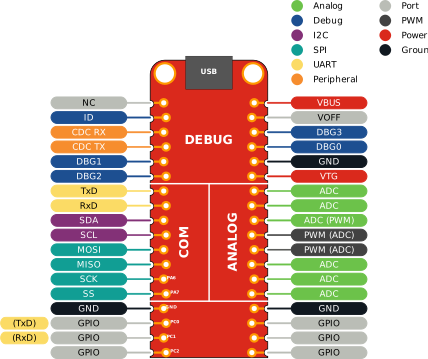
All Curiosity Nano boards follow a standardized pinout for key functions, as illustrated in the image below. Specific pins are reserved for the debugger interface, which supports programming protocols such as UPDI, SWD, or ICSP. Additional dedicated pins are provided for the CDC virtual serial port and the Data Gateway Interface (DGI).
- UART
- I2C
- SPI
Analog capability is guaranteed only for pins within the analog section. At least two of these pins support PWM output, and some kits may offer a third optional PWM pin.
1.4 Out-of-Box Demo
This is an interactive demo program.
- Mode 1 (default): Blinks the yellow user LED (LED0) at a frequency of 0.5 Hz.
- Mode 2: Adjusts the LED blink
frequency in real time:
- User switch (SW0) toggles the blinking frequency between 0.5 Hz and 1 Hz.
- Touch button toggles the blinking frequency between 0.5 Hz and 5 Hz.
- Mode 3: Pressing the user switch (SW0) transmits an 8-bit incrementing counter value over UART. This data can be monitored in real time using MPLAB® Data Visualizer.
Switch between programs by sending ‘1’, ‘2’, or ‘3’ over UART; send ‘0’ to reset and show the menu.
For full details, see: PIC32CM PL10 Curiosity Nano Out-of-Box Demo.