
6.4.2 Debugger Access Level (DAL)
The Boot ROM supports two levels of debugger access, known as Device Access Levels (DAL). These levels define the access a debugger has to the device during and after boot:
- DAL2: Full access. The device is completely open, allowing all operations supported by the device. This level is typically used during development and debugging.
- DAL0: Locked state. The device is highly restricted. Debug access is limited and defined by the user prior to setting DAL to 0.
The active DAL is determined by the value programmed into an internal memory location. Once configured, the DAL governs the debugger's ability to interact with the device, including access to memory, peripherals, and Boot ROM features:
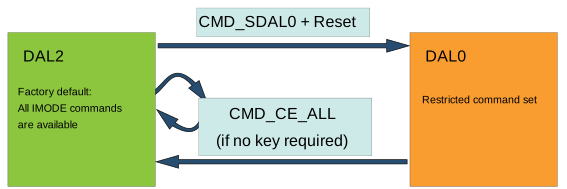
- The device is factory-programmed with DAL2 to allow the user to configure the device according to end application requirements. All commands of the Interactive mode IMODE are accessible, allowing full debugging and programming access.
- Once application development is finished, the device can be configured to DAL0 by issuing the Select DAL 0 command
CMD_SDAL0in IMODE and resetting the device. Now, only a restricted set of commands is available in IMODE.Note: Refer to the sections Programming and Debug Interface Disable (PDID) and Programming Specification for more information on how to restrict commands and access. - Issuing the Chip Erase All command
CMD_CE_ALLin IMODE will clear all Flash and volatile memories (but not the BOOTCFG and calibration fuses) and, eventually, set the DAL back to DAL2.CAUTION: It is possible to lock theCMD_CE_ALLcommand. When the device is set to DAL0 and theCMD_CE_ALLcommand is locked, the device may become permanently unrecoverable if the user does not retain access to the Key Value fuse required to unlockCMD_CE_ALL. Refer to the Programming Specification section for more information.
Warning: Carefully plan and validate the fuse configurations before transitioning the device to DAL0, especially in production environments where recovery options are limited.