6.2 Host Platforms With MikroBUS Connector
For platforms that have only mikroBUS™ connectors available, the evaluation kit can be used with the following signal configuration, except if the host is WBZ451 Curiosity.
| Pin | Name | mikroBUS Signal Name |
|---|---|---|
| 1 | AN | Supply Monitor |
| 2 | RST | XPL_TXEN |
| 3 | CS | XPL_CS |
| 4 | SCK | XPL_SCK |
| 5 | MISO | XPL_MISO |
| 6 | MOSI | XPL_MOSI |
| 7 | 3.3V | 3V3 |
| 8 | GND | GND |
| 9 | GND | GND |
| 10 | 5V | — |
| 11 | SDA | — |
| 12 | SCL | — |
| 13 | TX | — |
| 14 | RX | XPL_NRST |
| 15 | INT | XPL_EXTIN |
| 16 | PWM | XPL_NTHW0 |
The following figure illustrates the appearance of the signals once they are connected to the mikroBUS of the evaluation kit.
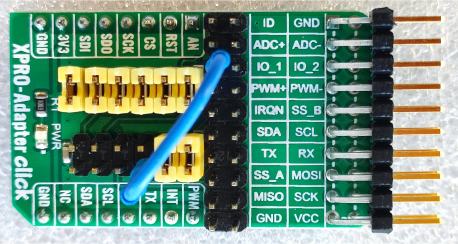
A prototyping board can be used to make this adaptation between the mikroBUS connector and the Xplained Pro connector. Another option is to use the kit together with the XPRO-Adapter click from MIKROE.
The following figure illustrates the schematics of the XPRO-Adapter click with the configuration to be used together with the PL460-EK.
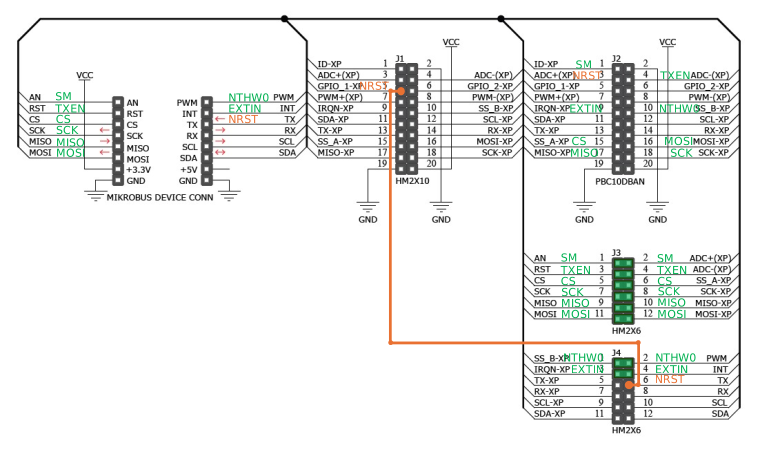
To use the XPRO-Adapter click with the PL460-EK, users need to make the following changes:
- Remove all unused GPIO jumper pins 5-6, 7-8, 9-10, 11-12 (TX, RX, SCL, and SDA signals of the mikroBUS connector).
- Add a wire between the pin 5 of J1 (GPIO_1-XP in schematic or IO_1 in silkscreen) and the pin 6 of J4 (TX signal of mikroBUS connector).