
7.9 Live Updates and Scaled Values
This section covers advanced Read/Write table features.
Automatic Updates (Live Polling)
The Read/Write table supports automatic periodic updates for watch variables.
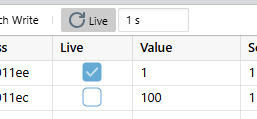
- Check the Live checkbox next to variables you want to update.
- Configure the sample interval in the panel settings.
- Click the Live button in the toolbar to start updating periodically.
Only variables marked as Live are updated, minimizing communication overhead.
Click the Live button again to stop polling.
The sample interval controls the update rate for Live variables. Configure based on how quickly the monitored values change and your bandwidth constraints.
Scaled Values
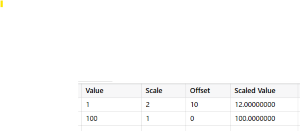
The Watch table has the possibility to calculate a scaled value for each variable row, by specifying custom Scale and Offset factors in the columns with the same names in the Watch table.
The resulting scaled value is the result of the
expression:
Scaled Value = Raw Value * Scale + OffsetIt is possible to edit the scaled value in the table. The raw value will then be updated accordingly.
Use Cases
Scaled values are useful for:
- Converting raw ADC values tp engineering units (voltage, current, etc.)
- Applying calibration offsets