
4.2.2 Connections Tab
Click the Connections tab to the left of the window to see available connections. After you connect a target to the PC, that connection will be displayed and the on-board data sources will be listed.
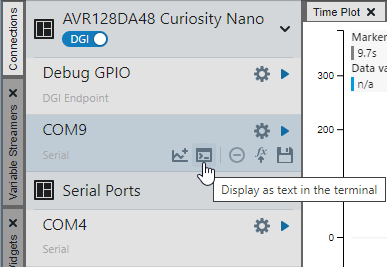
Find a data source that allows sending data to the terminal, i.e. has a
Display as text in the terminal button  . Select
the Source options button
. Select
the Source options button  to view or
change source settings, then select , or drag
the source and drop it onto the Terminal window. If you are connected and wish to change
the settings, you can disconnect by clicking now named
Remove from the terminal. Make your changes and then click
the button again to reconnect.
to view or
change source settings, then select , or drag
the source and drop it onto the Terminal window. If you are connected and wish to change
the settings, you can disconnect by clicking now named
Remove from the terminal. Make your changes and then click
the button again to reconnect.
For connection details, see External Connections.