
1.3.6 MPLAB Content Manager (CM) and Code Configurator (MCC)
MCC Content Manager
The MCC Content Manager allows users to download versions of supported drivers and libraries for a selected device.
| MPLAB X IDE | MPLAB Tools for VS Code |
|---|---|
|
MPLAB X IDE users can open the Content Manager before launching MCC by using:
The MCC Content Manager can also be opened from within MCC. However, the stand-alone Content Manager cannot be opened while MCC is already running, as this may result in unexpected or corrupted content. 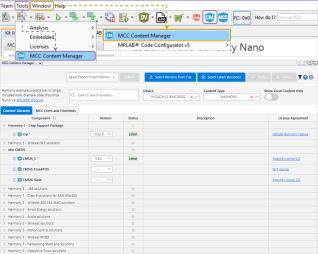 |
For VS Code users, the MCC Content Manager can only be opened from within the MCC’s Resources Panel. Refer to the next section on how to launch MCC. 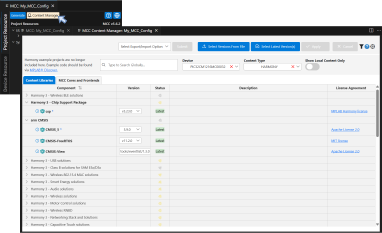 |
MPLAB Code Configurator (MCC)
The MPLAB Code Configurator (MCC) is a free graphical programming environment that generates seamless, easy-to-understand C code. MCC has content libraries that support different sets of microcontroller families.
-
MCC Melody: Supports 8-bit PIC® and AVR® MCUs, and dsPIC® DSCs
-
MPLAB Harmony: Supports all 32-bit MIPS® and Arm® Cortex®-based MCU and MPU devices
| MPLAB X IDE | MPLAB Tools for VS Code |
|---|---|
|
Launch MCC by using:
 |
Launch MCC by typing  For VS Code, users can also name the MCC configuration. By
default, MCC uses  Refer to these videos for tutorials on how to use MCC in VS Code:
|
Generated File Structure
The generated file and folder structure differs between MCC Melody and Harmony, as well as between MPLAB X IDE and VS Code MPLAB extensions.
MCC Melody
| MPLAB X IDE | MPLAB Tools for VS Code |
|---|---|
|
MCC Melody source and header files are generated inside a
folder named |
Inside the project folder, MCC generates a folder named after
the MCC configuration (e.g., MCC Melody generates both the
|
MPLAB Harmony
| MPLAB X IDE | MPLAB Tools for VS Code |
|---|---|
|
MPLAB Harmony source and header files are generated inside a folder named src, located outside of the project folder. Note: MPLAB Harmony warns users if it
detects an existing
src folder outside the
project folder. If this src folder belongs
to a different Harmony project, move the current project
folder into another folder before generating.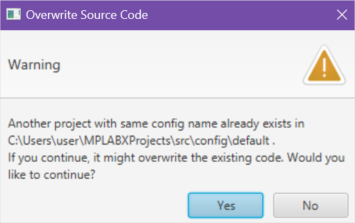 |
MPLAB Harmony generates the |