Table 1-6. Managing Project Properties and Configurations
MPLAB X IDE
MPLAB Tools for VS
Code
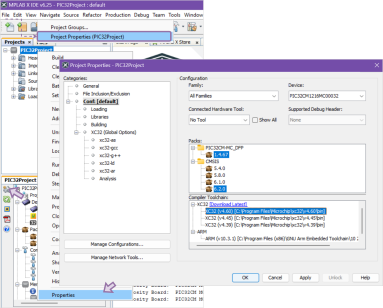
To configure project properties, use:
The File menu,
The Project Properties icon on the Dashboard, or
Right-click the project and select Project Properties
Figure 1-18. Project
Properties in MPLAB X IDE
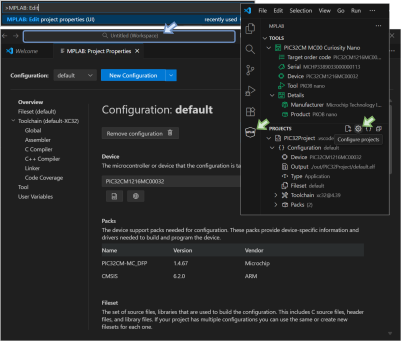
To configure project properties, use:
The command palette and type >MPLAB: Edit project
properties, or
Open MPLAB Tools from the activity bar and click the
Configure Projects icon in the Projects window
Figure 1-19. Project
Properties in MPLAB Tools for VS Code
Users have the option to add multiple configurations and switch between them using the
same steps as above.
The online versions of the documents are provided as a courtesy. Verify all content and data in the device’s PDF documentation found on the device product page.