
3.9.4.1.3 Example of DAC Wave Generation on PIC32CM LS00 Curiosity Nano+ Touch Evaluation Kit
Description
This example application shows how to use the DAC Peripheral library to generate a 1 kHz Sine or Sawtooth wave with look-up table. DAC starts conversion on a trigger from a timer period interrupt configured to occur at every 10 microseconds. In this application, the number of the DAC samples in a look-up table is 100.
Modules/Technology Used
- Peripheral Modules
- NVMCTRL
- EVSYS
- PM
- DAC
- TC
- EIC
- PORT
The following figure provides the MCC Harmony project graph with all the components.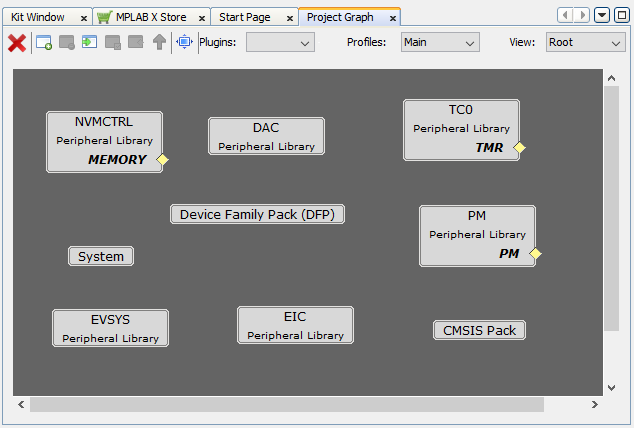
Hardware Used
Software/Tools Used
This project has been verified to work with the following versions of software tools:
Refer to the Project Manifest present in harmony-manifest-success.yml under
the project folder firmware\dac\src\config\pic32cm_ls00_cnano.
- Refer to the Release Notes to know the MPLAB X IDE and MCC Plug-in version
- Use the Saleae Logic Software to monitor the output
Due to Microchip regularly updates tools, occasionally issue(s) could be discovered while using the newer versions of the tools. If the project does not seem to work and version incompatibility is suspected. It is recommended to double-check and use the same versions that the project was tested with. To download original version of MPLAB Harmony v3 packages, refer to the document How to Use the MPLAB Harmony v3 Project Manifest Feature (DS90003305).
Setup
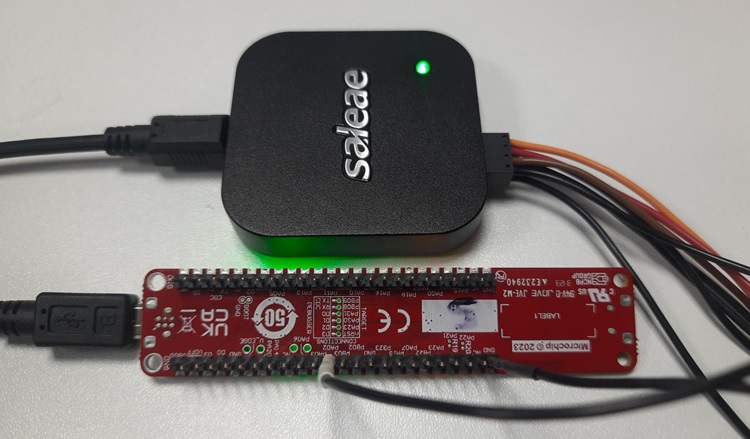
- Connect the PIC32CM LS00 Curiosity Nano+ Touch evaluation kit to the host PC as a USB device through a Type-A male to micro-B USB cable connected to Micro-B USB (Debug USB) port
- To establish the connection with the Saleae Logic Analyzer to the host PC
- Configure PA02 as channel 0 to
monitor the DAC output
Programming Hex File
The pre-built hex file can be programmed by following the below steps.
- Open MPLAB X IDE
- Close all existing projects in IDE, if any project is opened
- Go to
File>Import>Hex/ELF File - In the Import Image File window,
- Create Prebuilt Project,
- Click the Browse button to select the prebuilt hex file
- Select Device as PIC32CM5164LS00048
- Ensure the proper tool is selected under Hardware Tool and click the Next button
- Select Project Name and Folder,
- Select appropriate project name and folder and click the Finish button
- Create Prebuilt Project,
- In MPLAB X IDE, click the Make and Program Device button to program the device
- Follow the steps in Running the Demo section
Programming/Debugging Application Project
- Open the project
(
dac_wave_gen\firmware\dac\pic32cm_ls00_cnanogroup) in MPLAB X IDE - Ensure
PIC32CM LS00 Curiosity
                Nano
is selected as hardware tool to program/debug the application - Build the code and program the device by clicking on the Make and Program button in MPLAB X IDE tool bar
- Follow the steps in Running the Demo section
Running the Demo
- Open the Saleae logic application on the PC (from the Windows® Start menu by pressing the Start button)
- Observe a sine wave of 1 kHz frequency on DAC output pin PA02
- Press SW1 to switch the waveform shape between sine wave and sawtooth wave, and vice versa
Logic Analyzer Output
- The following sine wave output is
displayed on Saleae logic application.

- After pressing SW1, the sine wave
switches to a sawtooth wave and vice versa.

Comments
- Reference Training Module: Arm TrustZone Getting Started Application on PIC32CM LS60 (Arm Cortex-M23) MCUs
- This application demo builds and
works out of box by following the instructions in Running the Demo section. If the
user needs to enhance/customize this application demo, should use the MPLAB Harmony v3
Software framework. Refer to the following links to setup and build the applications
using MPLAB Harmony.
- How to Setup MPLAB Harmony v3 Software Development Framework (DS90003232)
- How to Build an Application by Adding a New PLIB, Driver, or Middleware to an Existing MPLAB Harmony v3 Project (DS90003253)
- How to Set up the Tools Required to Get Started with MPLAB® Harmony v3 and MCC
- Create a new MPLAB Harmony v3 project using MCC
- Update and Configure an Existing MHC-based MPLAB Harmony v3 Project to MCC-based Project