
8 Board Controller Functions
8.1 Voltage Monitor
The Nano Debugger uses an ADC channel to monitor the voltage on the target device. Reading the target voltage is controlled by the TVR (Target Voltage Readout) field in the board configuration - if this feature bit is cleared, then voltage monitoring is disabled.
The voltage monitor is a background task running in the Nano Debugger firmware that samples the ADC at regular intervals.
When used as an on-board debugger, the board designer sets the VMIN field in the board configuration, which specifies the minimum operating voltage value. Below this voltage, the Voltage Monitor registers that the target voltage is off. Handling of attempted programming and debugging operations in the off-state depends on the target device type.
pymcuprog getvoltagepymcuprog getsupplyvoltageUSB Voltage
The Nano Debugger can also read the voltage on the USB VBUS line, which is its power source. This is primarily a convenience feature.
pymcuprog getusbvoltage8.2 Voltage Control
The Nano Debugger can supply the target device with its own voltage source. This is optional for both on-board and standalone debugger configurations.
pymcuprog --setsupplyvoltage| Field | Description | Notes |
|---|---|---|
| ANALOG_FEATURES: TVS | Target voltage set | Indicates that the target voltage can be controlled |
| VMIN | Minimum operating voltage | Setting the voltage below this value will fail |
| VMAX | Maximum operating voltage | Setting the voltage above this value will fail |
| VTG | Default operating voltage | Voltage used when no voltage is set |
| VREG | Voltage regulator configuration | Indicates which regulator is mounted on the board |
Voltage Regulator Configuration 0 - None
No voltage control is available when this configuration is used.
When the VREG board configuration is set to 0x01, the Nano Debugger uses a DAC to regulate the voltage on the target device by manipulating the voltage on the feedback pin of a low drop-out regulator. The Nano Debugger monitors the output of this regulator as described in Voltage Monitor, and regulates the voltage accordingly.
The target voltage regulator is a MIC5353 variable output LDO. The Nano Debugger can adjust the voltage output supplied to the board’s target section by manipulating the MIC5353’s feedback voltage. The hardware implementation is limited to an approximate voltage range of 1.7V to 5.1V.
MIC5353 supports a maximum current load of 500 mA. It is an LDO regulator in a small package, placed on a small printed circuit board (PCB), and can reach thermal shutdown at loads lower than 500 mA. The maximum current load depends on the input voltage, the selected output voltage, and the ambient temperature. The figure below shows the safe operating area for the regulator, with an input voltage of 5.1V and an ambient temperature of 23°C.
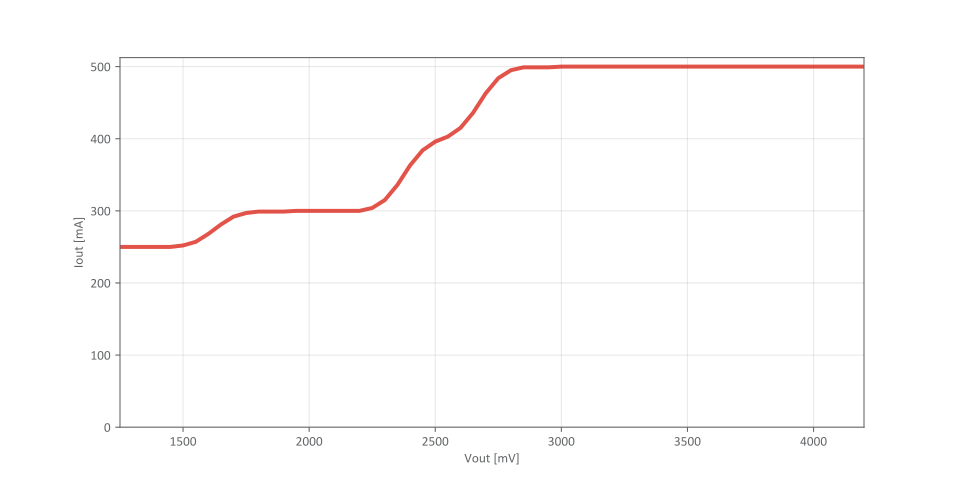
The voltage output of the target regulator is continuously monitored (measured) by the Nano Debugger. An error condition is flagged if a deviation of 100 mV above or below the expected voltage is detected. In this case, the voltage regulator will be switched off.
8.3 Voltage Off Pin (VOFF)
Instead of using the on-board target regulator, an external voltage can be used to power the target device. When the Voltage Off (VOFF) pin is shorted to the ground (GND) pin, the Nano Debugger firmware disables the target regulator, making it safe to apply an external voltage to the VTG pin.
The VOFF pin is used to allow a Curiosity Nano base board to provide power to a mounted Curiosity Nano kit. Voltage is applied via the VTG pin; otherwise, the two power supplies would be in contention. The base board pulls the VOFF pin low when it is connected.
The VOFF pin can be tied low or released at any time, and this change will be detected by a pin-change interrupt to the Nano Debugger, which will then control the target voltage regulator accordingly.
Programming, debugging, and data streaming are still possible with an external power supply. The USB cable powers the debugger and signal level shifters. Both regulators, the debugger, and the level shifters are powered down when the USB cable is removed.
8.4 Voltage Control Errors
This section summarizes the most common issues that can arise with the power supply.
Target Voltage Shuts Down
Not reaching the set target voltage can occur if the target section draws too much current at a given voltage, causing the thermal shutdown safety feature of the MIC5353 regulator to activate. To avoid this, reduce the current load of the target section.
Target Voltage Setting is Not Reached
The USB input voltage (specified to be 4.4-5.25V) limits the maximum output voltage of the MIC5353 regulator at a given voltage setting and current consumption. If a higher output voltage is needed, use a USB power source with a higher input voltage or an external voltage supply on the VTG pin.
Target Voltage is Different From Setting
An externally applied voltage to the VTG pin without setting the VOFF pin low can cause this. If the target voltage fluctuates by more than 100 mV above or below the voltage setting, the Nano Debugger will detect it, and the internal voltage regulator will shut down. To fix this issue, remove the applied voltage from the VTG pin, and the Nano Debugger will enable the voltage regulator when the new condition is detected. Note that the PS LED will blink rapidly if the target voltage is below 100 mV of the setting but will remain on if it is more than 100 mV above it.
No, or Very Low Target Voltage and PS LED is Blinking Rapidly
A full or partial short circuit can cause this and is a specific instance of the issue described above. Remove the short circuit, and the Nano Debugger will re-enable the target voltage regulator.
No Target Voltage and PS LED is Lit 1
This situation occurs if the target voltage is set to 0.0V. To fix this, set the target voltage to a value within the specified voltage range for the target device.
No Target Voltage and PS LED is Lit 2
This situation can occur when power jumper(s) are cut and the target voltage regulator is set to a value within the specified voltage range for the target device. To fix this, solder a wire or bridge between the pads or, if a pin header is mounted, add a jumper.
VBUS Output Voltage is Low or Not Present
If the VBUS output voltage is low or missing, the most likely reason is a high current drain on VBUS, which has caused the current limiter to trip and cut off VBUS completely. To fix this issue, reduce the current consumption on the VBUS pin.
8.5 ID System
The ID line on the Nano Debugger supports a mechanism used to identify base boards and extensions that are connected to the Xplained Pro (XPRO) extension header on those base boards.
During power-up, the Nano Debugger scans the ID line for both base boards and extensions and presents this information to the IDE upon request.