
33.4.3.3 Window Comparator
- The value is below the low threshold
- The value is above the high threshold
- The value is inside the window (above the low threshold and below the high threshold)
- The value is outside the window (either below the low threshold or above the high threshold)
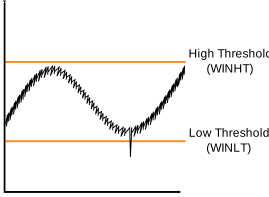
The thresholds are set by writing to the Window Low and High Threshold (WINLT and WINHT) registers. The desired window mode is selected by configuring the Window Comparator Mode bit field in the Window Control register (WINCTRL.WINMODE).
The Window Mode Source bit field in Window Control register (WINCTRL.WINSRC) selects whether the comparison is performed on the 16 LSb of the Result (RESULT) register or the Sample (SAMPLE) register. If interrupt requests are enabled for the WCMP flag, WINSRC also determines which interrupt vector to request: RESRDY or SAMPRDY.
When accumulating multiple samples, if the Window Comparator source is the Result register, the comparison between the result and the threshold(s) occurs after the last conversion is complete. If the source is the Sample register, the comparison occurs after every conversion.
- Set the required threshold(s) by writing to the WINLT and WINHT registers.
- Optional: Enable the interrupt
request by writing a ‘
1’ to the WCMP bit in the Interrupt Enable Set (INTENSET) register. - Optional: Write the WINCTRL.WINSRC bit to select the source used by the Window Comparator.
- Enable the Window Comparator by writing a non-zero value to WINCTRL.WINMODE.
The value in the RESULT register can exceed the number of bits available for window
comparison when the Result Scaling bit field in the Control D register (CTRLD.SCALING)
is configured to NORMAL and accumulating more than 2resolution -
8 (for example more than 24 = 16 samples
in 12-bit mode).