
19.5.6 Events
The DMAC can generate the following events:
| Generator Name | Description | Event Type | Generating Clock Domain | Length of Event | |
|---|---|---|---|---|---|
| Peripheral | Event | ||||
| DMAC | CH_n | Transfer on channel n is complete | Pulse | CLK_DMAC_AHB | One CLK_DMAC_AHB period |
Writing a ‘1’ to the Channel Event Output Enable bit in the Channel Control B (CHCTRLB.EVOE) register enables the corresponding event output. Writing a ‘0’ to this bit disables the corresponding event output.
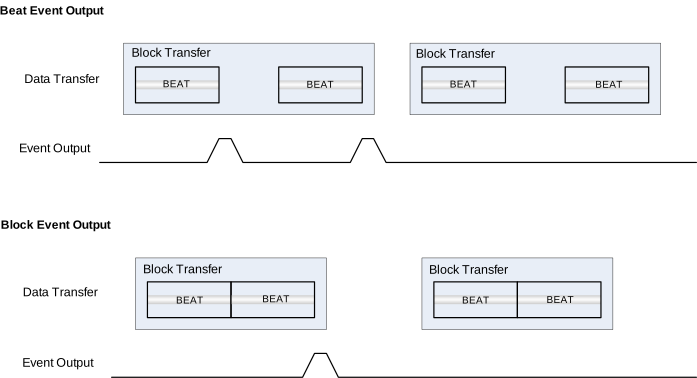
The event output cause is selected by writing to the Event Output Selection bits in the Block Transfer Control (BTCTRL.EVOSEL) register. It is possible to generate events after each block transfer (BTCTRL.EVOSEL = 0x1) or after each beat transfer (BTCTRL.EVOSEL = 0x3). To enable the generation of an event when a transaction is complete, the block event selection must be set only in the last transfer descriptor.
Figure 19-12 shows an example where the event output generation is enabled for the first block transfer and disabled for the second block.
The DMAC can connect to the following events:
| User Name | Description | Input Detection | Channel Path Type | |
|---|---|---|---|---|
| Peripheral | Input | |||
| DMAC | CH_n | Channel n | Level |
Asynchronous |
Writing a ‘1’ to a Channel Event Input Enable bit in the Channel Control B register (CHCTRLB.EVIE) enables the corresponding action on input event. Writing a ‘0’ to this bit disables the corresponding action on input event.
The event users can trigger the following actions:
| Event Input | Event Action | Description |
|---|---|---|
| CH_n | TRIG | Normal transfer or conditional transfer on strobe triggered by an event |
| CTRIG | Conditional transfer triggered by an event | |
| CBLOCK | Conditional block transfer triggered by an event | |
| SUSPEND | Suspends a channel's operation on event | |
| RESUME | Resumes a suspended channel's operation on event | |
| SSKIP | Skips the next block suspend action |
Refer to the EVSYS - Event System chapter for details on configuring the event system.