23.4.3.6 Time-stamp Capture
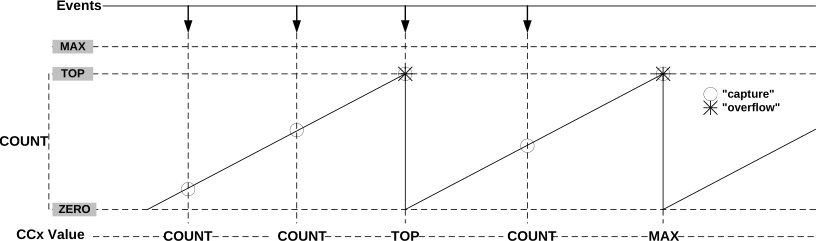
This feature is enabled when the Capture Time-stamp (STAMP) Event Action value is written to the Timer/Counter Event Input 0 Action bit field in the Event Control register (EVCTRL.EVACT0). The counter TOP value must be smaller than MAX.
When a capture event is detected, the COUNT value is copied into the corresponding Compare/Capture Channel n register (CCn). In case of an overflow, the MAX value is copied into the corresponding CCn register.
When a valid captured value is present in the capture channel register, the corresponding Match or Capture Channel n Interrupt Flag in the Interrupt Flag Status and Clear register (INTFLAG.MCn) is set.
The timer/counter can detect capture overflow of the input capture channels: When a new capture event is detected while INTFLAG.MCn is still set, the new time-stamp will not be stored, and the Error Interrupt Flag in the Interrupt Flag Status and Clear register (INTFLAG.ERR) will be set.