
23.4.2.6 Capture Operations
To enable and use capture operations, the Match or Capture Channel x Event Input Enable bit in the Event Control register (EVCTRL.MCEIx) must be set to '1'. The capture channels to be used must also be enabled by setting the Capture Channel x Enable bit in the Control A register (CTRLA.CPTENx) before capturing can be performed. Event system channels must be configured to operate in asynchronous mode when used for capture operations.
Event Capture Action
The compare/capture channels can be used as input capture channels to capture events from the Event System, and assign them a timestamp. The following figure shows four capture events for one capture channel.
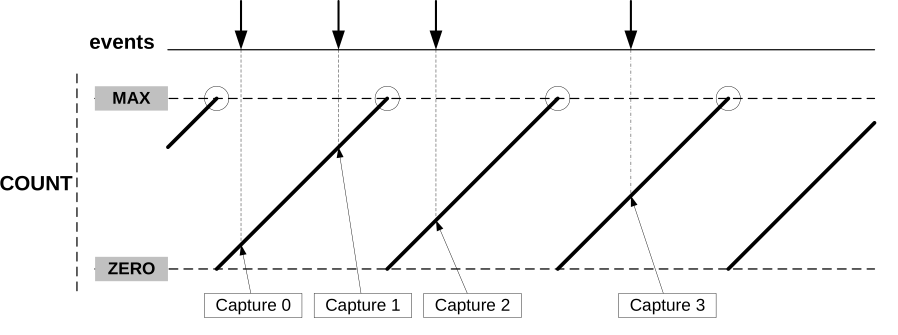
For input capture, the Compare/Capture Buffer Value in the Compare/Capture Buffer Channel x register (CCBUFx.CCBUF) and the corresponding Compare/Capture Value in the Compare/Capture Channel n register (CCn.CC) act like a FIFO. When CCn.CC is empty or read, any content in CCBUFx.CCBUF is transferred to CCn.CC. The buffer valid flag is used to set the Match or Capture Channel x Interrupt Flag in the Interrupt Flag Status and Clear register (INTFLAG.MCx) and generate the optional interrupt, event or DMA request. The CCBUFx.CCBUF value cannot be read all captured data must be read from the CCn register.
The TCC can detect capture overflow of the input capture channels: When a new capture event is detected while the Channel x Compare or Capture Buffer Valid flag in the Status register (STATUS.CCBUFV) is still set, the new timestamp will not be stored, and the Error Interrupt Flag in the Interrupt Flag Status and Clear register (INTFLAG.ERR) will be set.
Period and Pulse-Width (PPW) Capture Action
The TCC can perform two input captures and restart the counter on one of the edges. This enables the TCC to measure the pulse-width and period, and to characterize the frequency f and dutyCycle of an input signal:
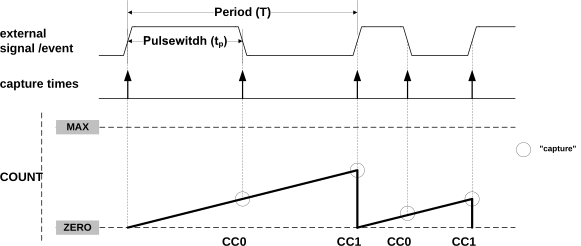
Selecting PWP in the Timer/Counter Event Input 1 Action bit field in the Event Control register (EVCTRL.EVACT1) enables the TCC to perform one capture action on the rising edge and another on the falling edge. When using the event action, the period T will be captured into CC1 and the pulse width tp into CC0.
The Timer/Counter Event n Invert Enable bit in the Event Control register (EVCTRL.TCEINVn) is used for event source x to select whether the wraparound should occur on the rising edge or the falling edge. If the EVCTRL.TCEINVn bit is set, the wraparound will occur on the falling edge.
The corresponding capture is performed only if the channel is enabled in capture mode
(CTRLA.CPTENn = 1). If not, the capture action will be ignored, and the
channel will be enabled in compare mode of operation. When only one of these channel is
required, the other channel can be used for other purposes.
The TCC can detect capture overflow of the input capture channels: When a new capture event is detected while the Match or Capture Channel x Interrupt Flag in the Interrupt Flag Status and Clear register (INTFLAG.MCn) is still set, the new time-stamp will not be stored, and the INTFLAG.ERR flag will be set.
1 cannot be captured in Capture Minimum mode (when the
Recoverable Fault n Capture Action bit field in the Fault Control x register
(FCTRLx.CAPTURE) is set to CAPTMIN). To capture the full range, including value
0, the TCC must be configured in down-counting mode
(CTRLBCLR/SET.DIR is cleared).1.