
23.4.2.3 Counter Operation
Depending on the mode of operation, the counter is cleared, reloaded, incremented, or decremented at each TCC clock input (CLK_TCC_COUNT). A counter clear or reload marks the end of current counter cycle and the start of a new one.
The counting direction is set by writing to the Counter Direction bit in the Control B Set register (CTRLBSET.DIR). The counter counts down if the bit is '1', and up when the bit is '0'.
The counter will count up or down for each tick (clock or event) until it reaches TOP or ZERO. When counting up and TOP is reached, the counter will be set to zero at the next tick (overflow), and the Overflow Interrupt Flag in the Interrupt Flag Status and Clear register (INTFLAG.OVF) will be set. When counting down, the counter is reloaded with the TOP value when ZERO is reached (underflow), and INTFLAG.OVF is set.
INTFLAG.OVF can be used to trigger an interrupt, a Direct Memory Access (DMA) request, or an event. An overflow or underflow occurrence (i.e, a compare match with TOP or ZERO) will stop counting if the One-Shot bit in the Control B register (CTRLBSET.ONESHOT) is set. The One-Shot feature is explained in the Additional Features section.
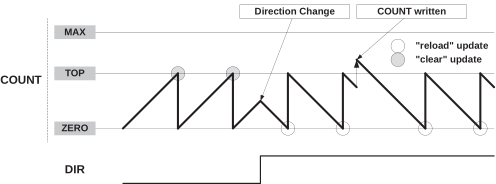
It is possible to change the counter value (by writing directly to the Counter register (COUNT)) even when the counter is running. The COUNT value will always be ZERO or TOP, depending on the direction set by the Counter Direction bit in the Control B Clear or Set registers (CTRLBCLR/SET.DIR), when starting the TCC, unless a different value has been written to it or the TCC has been stopped at a value other than ZERO. Write access has higher priority than count, clear, or reload operations. The direction of the counter can also be changed during normal operation. See the Counter Operation figure above for further information.
Stop Command
A stop command can be issued from software by writing the STOP command value to the TCC Command bit field in the Control B Set register (CTRLBSET.CMD).
When a stop is detected while the counter is running, the counter will maintain its current value. If waveform generation (WG) is used, all waveforms are set to a state defined in Non-Recoverable State x Output Enable bit and Non-Recoverable State x Output Value bit in the Driver Control register (DRVCTRL.NREx and DRVCTRL.NRVx), and the Stop bit in the Status register (STATUS.STOP) is set.
Stop Event Action
A stop command can also be triggered by event input 1 by writing the STOP action value to the Input Event Action 1 bits in the Event Control register (EVCTRL.EVACT1).
When a stop action is detected, the counter can stop immediately, maintaining its current value and all waveforms keep their current state, as long as a start event action is detected through the: Input Event Action 0 bits in Event Control register (EVCTRL.EVACT0).
Retrigger Command and Event Action
A retrigger command can be issued by software by writing the RETRIGGER command value to the CTRLBSET.CMD bit field, or by events by writing the RETRIGGER action value to the Input Event 0/1 Action bits in Event Control register (EVCTRL.EVACTx).
When the command is detected during counting operation, the counter will be reloaded or cleared, depending on the counting direction set in CTRLBCLR/SET.DIR, and set the Retrigger Interrupt Flag bit (TRG) bit in the Interrupt Flag Status and Clear register (INTFLAG) . It is also possible to generate an event by writing a '1' to the Retrigger Event Output Enable bit in the Event Control register (EVCTRL.TRGEO).
Start Event Action
The start action can be enabled by writing the START action value to the Timer/Counter Event Input 0 Action bit field in the Event Control register (EVCTRL.EVACT0), and can start the counting operation when previously stopped. The event has no effect if the counter is already counting. When the module is enabled, the counter operation starts when the event is received or when a retrigger software command is applied.
Count Event Action
The TCC can count events. When an event is received, the counter increments or decrements its value, depending on the direction set in CTRLBCLR/SET.DIR.
The count event action can be enabled by writing the COUNTEV or COUNT_ASYNC action value to the EVCTRL.EVACT0 bit field.
Count on Active State of Asynchronous Event
The TCC counts during the active state of an asynchronous event (incrementing or decrementing, regardless of the direction set in CTRLBCLR/SET.DIR).
Direction Event Action
The direction event action can be enabled by writing the DIR_ASYNC action value to the EVCTRL.EVACT1 bit field. When this event is triggered, the asynchronous event path specified in the event system must be configured or selected. The direction event action can be used to control the direction of the counter operation, depending on external events level. When received, the event level overrides the Direction settings in CTRLBCLR/SET.DIR and the direction bit value is updated accordingly.
Increment Event Action
The increment event action can be enabled by writing the INC action value to the EVCTRL.EVACT0 bit field and can change the counter state when an event is received. When the TCE0 event (TCCn_EV0) is received, the counter increments, regardless of the direction setting in CTRLBCLR/SET.DIR is.
Decrement Event Action
The decrement event action can be enabled by writing the DEC action value to the EVCTRL.EVACT1 bit field, and can change the counter state when an event is received. When the TCE1 (TCCn_EV1) event is received, the counter decrements, regardless of the direction setting in CTRLBCLR/SET.DIR is.
Non-recoverable Fault Event Action
Non-recoverable fault actions can be enabled by writing the FAULT_ASYNC action value to the EVCTRL.EVACTx bit field. When such an event is received, the counter will be stopped, and the output of the compare channels will be overridden according to the Driver Control register settings in the DRVCTRL.NREx and DRVCTRL.NRVx bit fields. TCE0 and TCE1 must be configured as asynchronous events.
Event Action Off
If the event action is disabled by writing the OFF action value to the EVCTRL.EVACTx bit field, enabling the counter will also start it.