3.3 Hardware Issue - Management Interface (MDC/MDIO) Connectivity
If both Fundamental PCB Design and PCB Assembly or ID Damage are ruled out as root causes, focus on the followings items:
- Check for Management Signals: The MAC should be able to communicate with the PHY through the management interface. Attempt to read from various PHY registers and confirm that the MDC/MDIO signals are being generated. Additionally, check if there is a response from the PHY.
Tip: For more information on testing the
management signals, refer to Appendix: PHY Low Level Management Techniques
- Check voltage levels and clock frequency: If no response is seen from the PHY, it could be the frequency or voltage levels. Confirm with the MAC and PHY datasheets that the voltage levels and frequencies are within the supported ranges.
- Check the PHY Address: If no response is seen from the PHY, this issue could be the PHY address. Check the PHY address that the MAC is sending the request to, as well as the PHY address that the PHY is configured to (Table 2-2 in the KSZ8081MNX Datasheet).
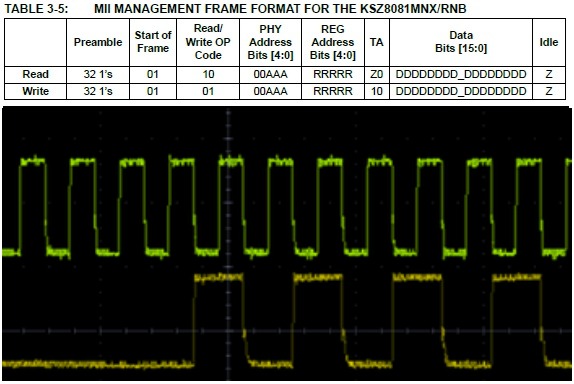
- Check the message format: Modern PHYs and MACs have the ability to support different data formats. Confirm that the MAC data format is compatible with the KSZ8081MNX.
Figure 3-2. Clause 22 Data Format