
3.5 Hardware Issue - Ethernet Connectivity
- Confirm Ethernet Signals: The Ethernet Electrical Tests are a good way to check the quality of the Ethernet signals generated by the PHY. Even if a full compliance test suite is not available, the procedure to put the PHY into the various test modes, or trigger the oscilloscope to capture the compliance signals, can identify if any signal integrity issues may be the cause of the communication problems (E.g., the template mask is not required to observe if there is excessive noise on a test signal).
Tip: Refer to the Ethernet Compliance Testing application note for procedures to put the PHY into various test modes for electrical signal integrity measurements.
- Try Different Cables: Ensure the cable being used are Cat5 quality. Its very common for Ethernet cables to be unlabeled or a system to utilize non-standard cables. When attempting to debug Ethernet connectivity issues, all testing should start with known compliant cabling. If in doubt, purchase new cables from a reputable vendor. Try both long and short cables to see if a connection can be established.
- Probe for NLP/FLP: When Auto Negotiation is enabled, the Ethernet transmitter will issue Normal Link Pulses (NLP) or Fast Link Pulses (FLP) on the wire. If the Ethernet interface is configured for 10Mbit/s speeds only, a NLP 100 nanosecond pulse is sent every 16 milliseconds. If Auto-negotiation is enabled, a group of 33 FLP pulses are sent, one after another, every 16 milliseconds. An oscilloscope can be used to observe these pulses. If the pulses are present, then the Ethernet interface is enabled and highly functional.Tip: Refer to Appendix B for information on PHY Link options and debug techniques.
Figure 3-3. NLP/FLP PULSES 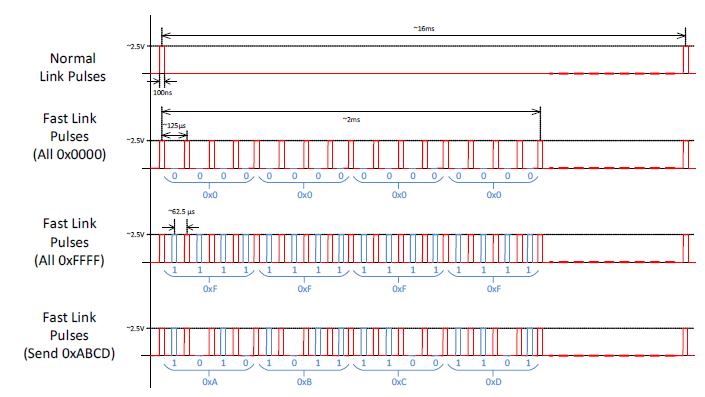
- Check Magnetics: Selecting proper magnetics for the KSZ8081MNX is important for ensuring proper connectivity. Refer to the Magnetics Selection Guide for guidance. If using KSZ8081MNX with a magnetic-less connection, refer to the Capacitive Coupling application note for more details.
- Collect an Ethernet Protocol Trace: Use Wireshark to collect an Ethernet protocol trace to see if any communication is present. If Wireshark cannot be run on a PC connected to the network, then a discrete Ethernet protocol analyzer or Ethernet protocol tap device (such as a SharkTap) can be used.
- Submit a Support Case to Microchip: If The Ethernet connectivity issue is still not resolved or understood after following these debug items, go back to the Hardware Issue - Fundamental PCB Design and Hardware Issue - PCB Assembly or IC Damage sections and review all guidance again. If the issue is still not resolved or understood, submit a support case to Microchip support with all of your findings clearly documented. Be sure to include the answers to the questionnaire in Problem Statement Questionnaire and all data logs described in Data Logging in the support case submission to accelerate the time to submission (if you cannot collect any of the request logs for any reason, state this upfront in the case submission as well).