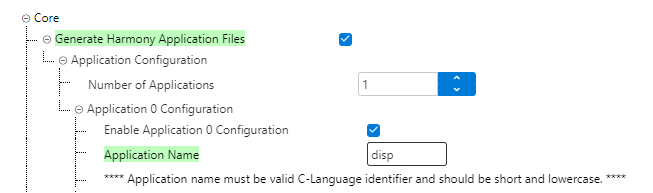
Generate the Harmony application file
(“Application 0”)
In the Available
Components panel, expand Core.
Enable Generate Harmony
Application Files. This creates a framework for your custom
application file to write the display driver.
Configure Application 0:
Expand the application configuration and specify
the number of applications. Enable Application 0 Configuration
appears as shown below.
Set properties:
Name: optionally, rename to “disp” for
clarity.
Type: application (default).
Generate Files: enable this option to
create template files (disp.c,
disp.h).
MCC generates a basic application structure under
firmware/src/config/<config_name>/disp.c.
The online versions of the documents are provided as a courtesy. Verify all content and data in the device’s PDF documentation found on the device product page.