
8.2 Creating a Blank Quickstart Touch Interactive Application
This section describes how to create a blank Quickstart application from GitHub using MPLAB Harmony v3 on the SAMA7D65-Curiosity board and the Raspberry Pi Touch Display 2. The application will be used to check the display’s functionality.
- Navigate to gfx_apps_sam_a7d65/apps/blank_quickstart at
master · Microchip-MPLAB-Harmony/gfx_apps_sam_a7d65 ·
GitHub. In the
srcfolder, the application file contains a blank Quickstart application. - Identify the key files
(
app.candapp.h) for the Quickstart application. - To set up the project graph, make the following changes:
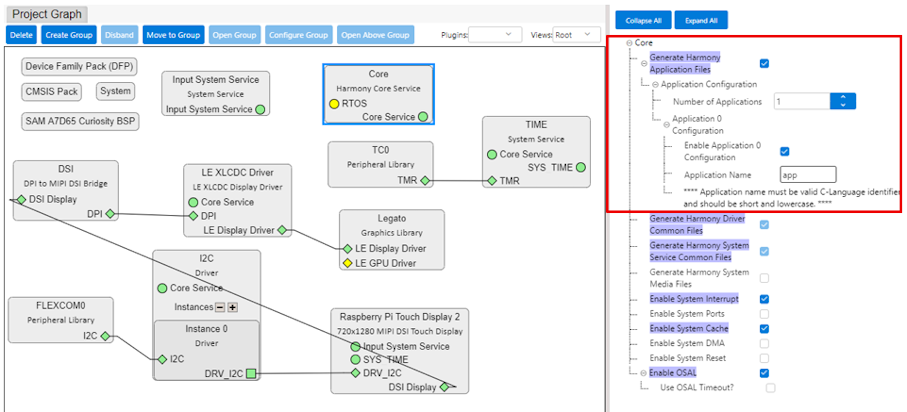
- Once the project is generated, two
files are created. Copy the contents of the source and header files from GitHub to
the corresponding files in the project.
- Build and debug the project to verify the touch and display functionalities of the custom display.