
4.1.1 Dual-Band Receiver with Two Antennas
The first scenario details the use of low-band and high-band frequencies with two antennas. The following figure illustrates an application utilizing two antennas to simplify implementation, with one frequency in the low band and another in the high band. Each input matches the target RF, and each antenna is designed for a specific resonance frequency, minimizing system losses due to mismatch.
The following figure illustrates a dual-band receiver setup using low-band and high-band inputs, each connected to its own antenna, corresponding to RFIN_LB and RFIN_HB with two antennas (RFIN_LB + RFIN_HB + 2 x ANT).
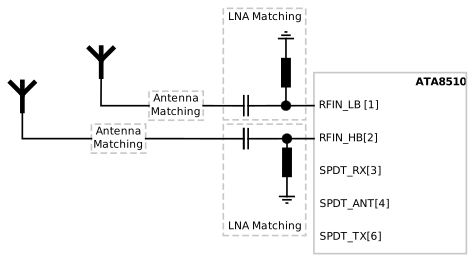
Matching the antenna and each LNA is straightforward, as each part can be investigated separately. Ensure LNA is activated during the matching process.
SetSystemMode SPI command. In this scenario, service 0 holds the configuration for low band and service 1 for high band:if (usedBand == LOW_BAND)
{
API_SetSystemMode(0x22,0x40);
// 0x22 >> VCO Tuning and OPM_RX
// 0x40 >> RX Path A, Service 0, Channel 0
}
else
{
API_SetSystemMode(0x22,0x41);
// 0x22 >> VCO Tuning and OPM_RX
// 0x41 >> RX Path A, Service 1, Channel 0
}