
4.2.1 Dual-Band Transmitter with Two Antennas
This approach is the most common for dual-channel RF transmitter applications. The Power Amplifier (PA) serves all supported frequency ranges, and the two antennas allow optimized radiation. Main matching occurs after the PA, while individual adaptation to each frequency occurs in the switched path. This ensures the correct load impedance for the PA for each RF band and output settings.
The following figure illustrates a dual-band transmitter configuration where two RF bands are each transmitted through their own dedicated antenna (2 x RF Band + 2 x ANT).
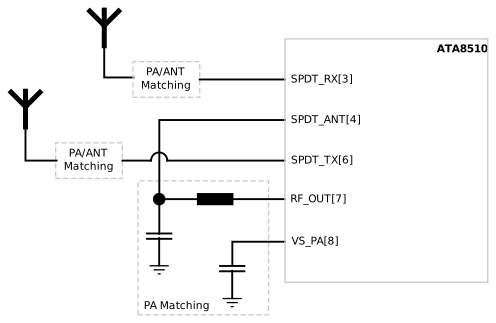
Even if this is a valid and applicable use case, the users must balance performance between the RF bands. Matching the antennas and PA is straightforward, as each switched path can be investigated separately. Ensure PA is activated during the matching process. For optimized load impedance, use a spectrum analyzer to verify output power and harmonic radiation in each single-use case, as vector network analyzer measurement is not possible.
SetSystemMode SPI command. In this example, service 0 holds the configuration for low band and service 1 for high band:if (usedBand == LOW_BAND)
{
API_SetSystemMode(0x21,0x40);
// 0x21 >> VCO Tuning and OPM_TX
// 0x40 >> RX Path A, Service 0, Channel 0
}
else
{
API_SetSystemMode(0x21,0x41);
// 0x21 >> VCO Tuning and OPM_TX
// 0x41 >> RX Path A, Service 1, Channel 0
}To set the SPDT to the correct position for the selected service, ensure that the right configuration is loaded. For more details, see Figure 4-3.