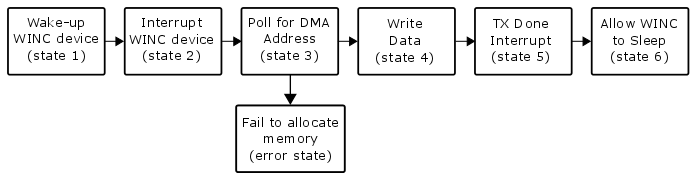
The following figure shows the steps and states involved in sending a message
from the host to the WINC device.Figure 13-3. HIF Frame Transmit to
WINC
Table 13-1. Steps in HIF Frame Transmit to WINC
Step
Description
Step (1) Wake up the WINC device
Wake up the device to be able to receive the host
requests.
Step (2) Interrupt the WINC device
Prepare and set the HIF layer header to
NMI_STATE_REG register (4 bytes header describing the sent
packet).
Set BIT [1] of WIFI_HOST_RCV_CTRL_2 register to
raise an interrupt to the WINC chip.
Step (3) Poll for DMA address
Wait until the WINC chip clears BIT [1] of
WIFI_HOST_RCV_CTRL_2 register.
Get the DMA address (for the allocated memory) from
register 0x150400.
Step (4) Write data
Write the data blocks in sequence, the HIF header
then the Control buffer (if any) then the Data buffer (if
any).
Step (5) TX Done Interrupt
Send a notification that writing the data is
completed by setting BIT [1] of WIFI_HOST_RCV_CTRL_3
register.
Step (6) Allow the WINC device to Sleep
Allow the WINC device to enter Sleep mode again (if
it wishes).
The online versions of the documents are provided as a courtesy. Verify all content and data in the device’s PDF documentation found on the device product page.