
8.4 Browsing and Selecting Symbols
Once the ELF file is loaded, you can browse and select variables to add to the X2Cscope, Scope Channels table, or Watch table (described in the following sections).
The symbol browser provides access to global variables, struct or union members and array elements defined in your firmware.
Selecting Variables
To add a variable to a table:
- Click a cell in the Name column of the table.
- Start typing to filter the list of available symbols.
- Select the desired variable from the drop-down.
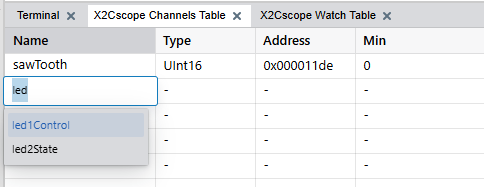
The selected symbol appears in the table cell with related information (address, type, size) populated automatically.
You can also select struct or union members and individual array elements.
Detailed Instructions
The symbol browser works identically for both X2Cscope and DVRT protocols. For
detailed step-by-step instructions on:
- Selecting struct/union members or array elements.
- Managing and reordering table entries.
- Removing variables.
See Selecting Symbols in the DVRT Protocol documentation. The symbol browser interface and procedures are the same for X2Cscope.