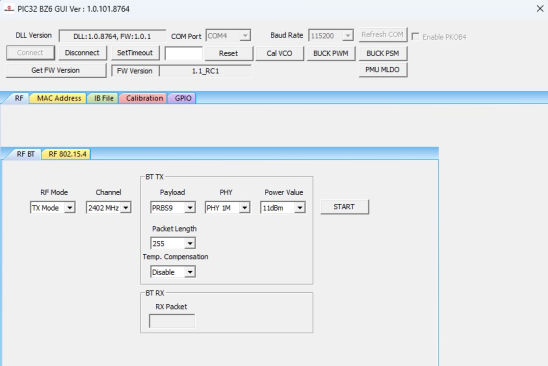
Perform the following steps for the demonstration of the Bluetooth RF TX modulation
test:
Set up the connection between the
PIC32-BZ6 Curiosity Board and PC. For more
details, refer to Getting Started with MCHPRT3.
In the RF BT tab, perform
the following steps:
From the “RF Modes”
drop-down list, select TX Mode.
From the “Channel”
drop-down list, select 2402 MHz for channel 37.
From the “Payload”
drop-down list, select PRBS9 (default value).
From the “PHY” drop-down
list, select the Data Rate (1M, 2M, S = 2 and S = 8), for
example, select PHY 1M.
From the “Power”
drop-down list, select the Output Power, for example, select
11 dB.
From the “Packet Length”
drop-down list, select the Packet Length (0-255), for example,
255 (default value).
From the “Temp. Compensation” drop-down list, select Enable or
Disable. The output power compensates according to the
ambient temperature.
Click START to transmit the Bluetooth Low Energy packet.
Figure 4-7. MCHPRT3PIC32-BZ6 GUI for Bluetooth RF TX Modulation
Test Demonstration
DS50004106B
The online versions of the documents are provided as a courtesy. Verify all content and data in the device’s PDF documentation found on the device product page.