
42.5.2.6.3 Match Frequency (MFRQ)
For Match Frequency generation, the period time (T) is controlled by CC0 register instead of PER. WO[0] toggles on each update condition.
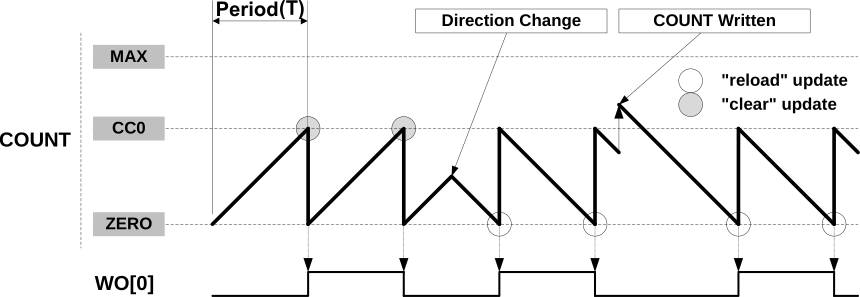
The following steps must be performed to operate the TCC in Match Frequency (MFRQ) Operation.
- Configure the clock source for the TCC Instance in the Main Clock Controller (MCLK) and enable the APB BUS clock for the TCC Instance by writing a ‘1’ to the TCCx_ bit in the "Peripheral Bus Clock Enable Maskn Register" register of the MCLK module.
- Enable Generic clock for TCC Instance
- Select desired prescaler by setting CTRLA.PRESCALER bits (CTRLA<10:8>).
- Set Waveform Generation Operation to MATCH Frequency Operation (MFRQ) by setting WAVE.WAVEGEN bits (WAVE<2:0> = 0x1).
- Load the selected Compare/Capture (CC) register (e.g. CC0<31:0>) with the desired compare match value. The generated output will toggle on this match, PER register is not used in this operations.
- Set Counter to count in up direction by clearing CTRLBCLR.DIR bit (CTRLBCLR<0> = 1). To change the counter direction down set counter direction bit CTRLBSET.DIR(CTRLBSET<0> =1).
- The waveform output can be inverted by configuring DRVCTRL.INVEN0 bit (DRVCTRL<16>).
- If overflow interrupt is used, set INTENSET.OVF bit (INTENSET<0>) and configure the NVIC by setting group priority, sub priority and enabling corresponding TCCx IRQ.
- Enable TCC by setting CTRLA.ENABLE bit (CTRLA<1>).
- To know how to clear interrupts, see Interrupts.