
5.5 Configure Design Initialization Data and Memories
(Ask a Question)The Configure Design Initialization Data and Memories option creates the non-PCIe transceiver initialization client, which initializes the transceiver block when the PolarFire device powers up.
To create the transceiver initialization client, perform the following steps:
- On the Design Flow window,
double-click Configure Design Initialization Data and
Memories. The Design and Memory
Initialization window opens, as shown in the following
figure.
Figure 5-5. Design and Memory Initialization Window 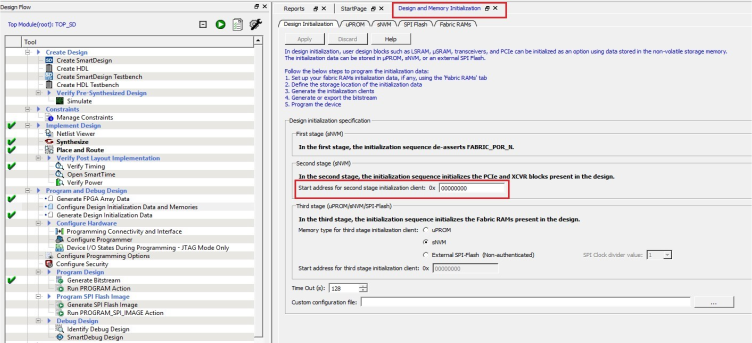
- Under Second stage (sNVM) pane, enter the start address where the transceiver initialization client must be created in the sNVM, as shown in the preceding figure.
- The hex file generated from the embedded software example project using the SoftConsole IDE is configured as a memory client. This embedded software application will start executing at the power-on. The Optional Tightly Coupled Memory (TCM) which is available in the MIV_RV32 soft processor is enabled in this design.
- Under Fabric RAMs section, configure the TCM memory with
associated hex file. The following figure depicts the same.
Figure 5-6. Fabric RAMs Section 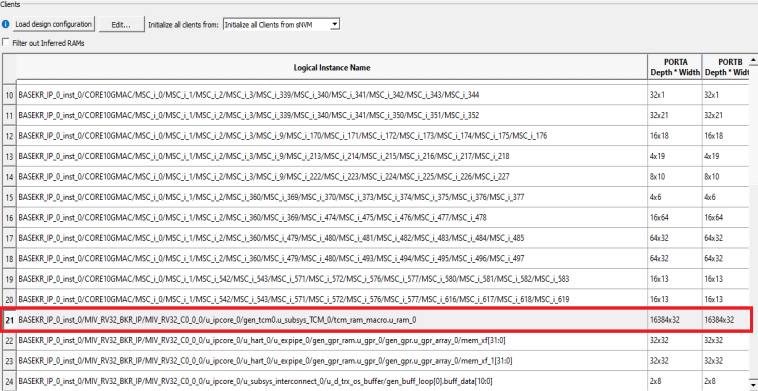
- On the Design Flow window, double-click on Generate Design Initialization Data to generate the initialization client. When the initialization client is generated, a green tick mark appears next to Generate Design Initialization Data, as shown in Figure 5-1.