6.3.5 Bluetooth Low Energy OTA DFU Image Distribution Procedure
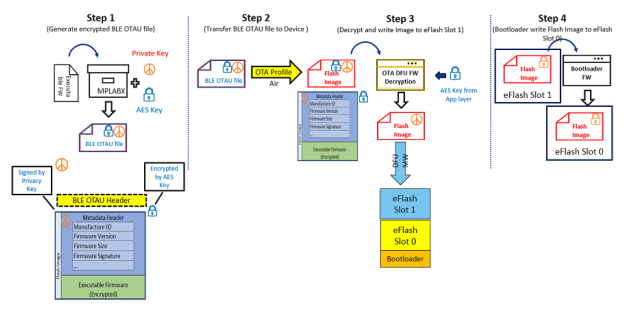
The following steps explain the Bluetooth® Low Energy (Bluetooth® LE) OTA DFU image distribution procedure:
- Encrypted and signed Bluetooth LE OTAU bin file generation using signature and OTA configurator from MPLAB X tools device properties.
- Store the generated OTAU file in the OTAU manager.
- Transfer the OTAU Flash image over Bluetooth LE OTA profile/service to OTAU target.
- The target device uses its AES key to decrypt the received image and stores it in embedded Flash slot 1.
- After the device receives the complete image, it resets. The bootloader authenticates the new image and, if valid, copies it from slot 1 to slot 0.