6.3.1 Bluetooth Low Energy OTA DFU Firmware
Architecture
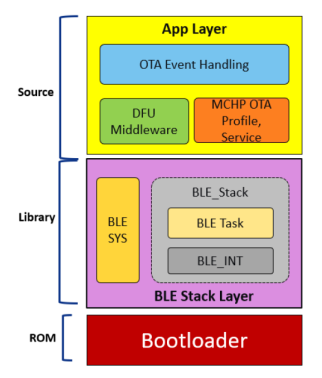
The following figure illustrates the Bluetooth® LE OTA DFU firmware
architecture of the PIC32WM-BW1.Figure 6-34. Bluetooth® LE OTA DFU Firmware Architecture
MCHP OTA Profile and Service Middleware
Defines and handles the
Microchip-defined Bluetooth LE GATT server and profile for getting the
upgradable image over a Bluetooth LE link.
Implements OTA state
management and error handling.
Implements defragmentation
and decryption of the received new image.
Note: For more details on the MCHP OTA Profile and Service Middleware, refer
to the Microchip Over the Air (OTA) Profile section of the MPLAB
Harmony Wireless BLE in the Reference Documentation from Related
Links.
DFU Middleware
DFU APIs for writing the OTA
image into embedded Flash.
This module provides DFU
capabilities common across the different supported transport mediums like
UART and Bluetooth LE.
Note: For more details on the DFU
Middleware, refer to the Device Firmware Update (DFU) section of
the MPLAB Harmony Wireless BLE in the Reference Documentation from
Related Links.
OTA Event Handling
OTA events from MCHP OTA
Profile and Service middleware is sent to application for DFU permission.
For more details, refer to the BLE_OTA section in the Wireless
System Services API chapter of the PIC32CXBZ2 Application Developer's Guide.
OTA DFU Encryption Key Management
Trigger new Flash image
authentication by calling bootloader API.
Timeout handling in case of
failure/error while receiving the image.
Bootloader
Bootloader is responsible for
authentication and activation of new firmware, booting into the application,
optionally entering into Serial DFU mode to get new image over serial
interface. For more details, refer to the PIC32CX-BZ2 Standalone
Bootloader Component Help section of the MPLAB Harmony PIC32CX-BZ
System Services in the Reference Documentation from Related
Links.
Note: Bootloader code is running from boot
ROM in the PIC32CXBZ2 family of devices.