1.1.3 Tuning Options for Touch in Melody/Harmony
Overview
This section gives an overview of how to use the tune option in the Touch Configurator.
Details
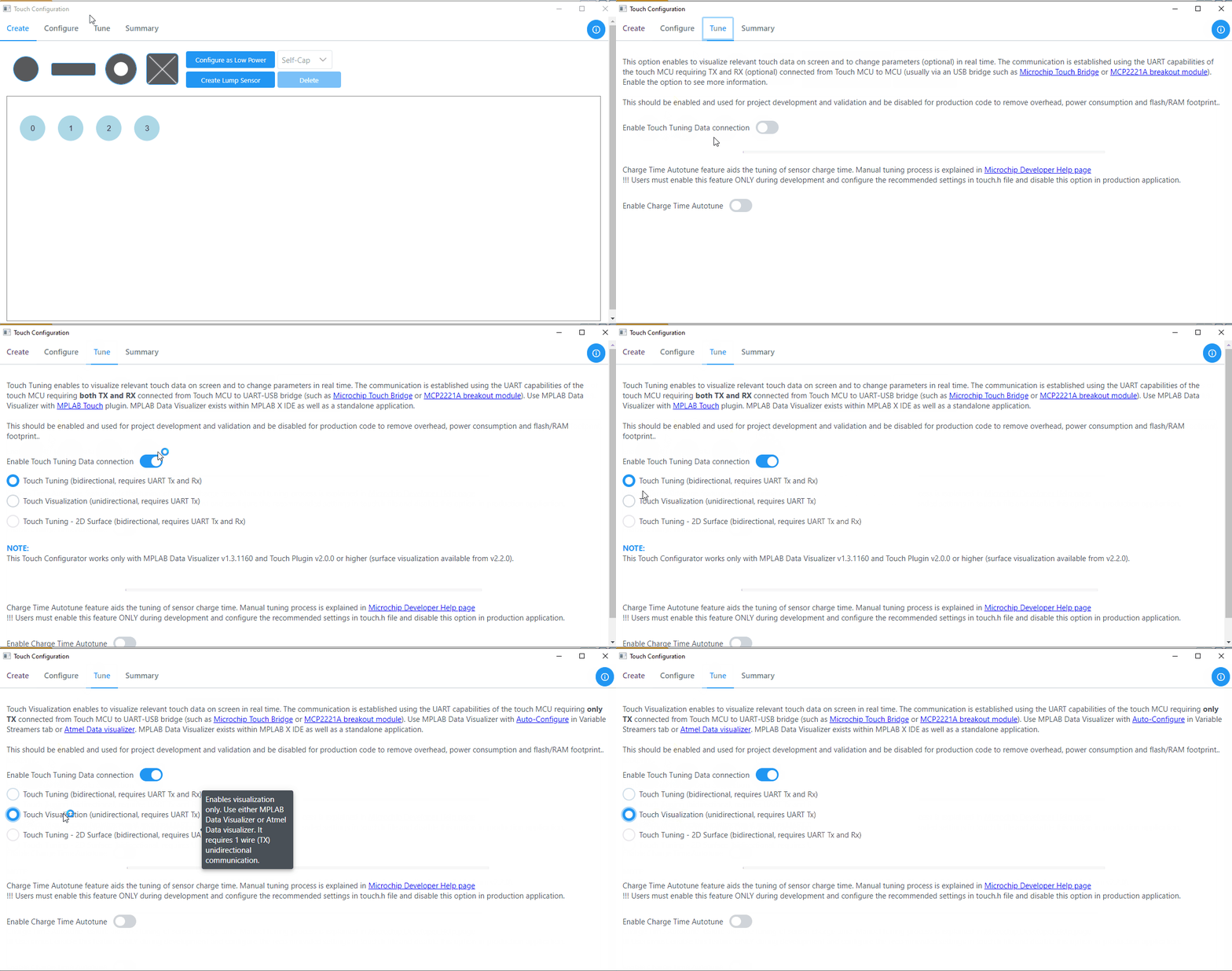
The two options in touch tuning are:
- Touch Tuning (bidirectional,
requires UART Tx and Rx)
This option is useful when user wanted to see effect of a touch parameter by few clicks instead of changing in
.hfiles and programming the device with updated configuration. Bidirectional requires both Tx and Rx wires.If bidirectional is selected, then the project is generated with
Touchtune.candTouchtune.hfiles. A detailed procedure on how to visualize data using bidirectional can be found in Guide to View Touch Tune Data Using MPLAB® Data Visualizer section. - Touch Visualization
(unidirectional, requires UART Tx)
This option is useful to visualize touch data, and it only requires one wire, meaning Tx in this case.
If unidirectional is selected, the project is generated with
datastremer.canddatastreamer.hfiles (along with.db,.dsand.sbfiles). A detailed procedure on how to visualize data using unidirectional is found in the Visualize Touch Data Using MPLAB® Data Visualizer section.
Procedure
Enable tuning and select the configuration by following the steps below.
Open the Touch Configurator, go to the Tune tab and select Unidirectional/Bidirectional.