
6.4 Step 4: Program Devices
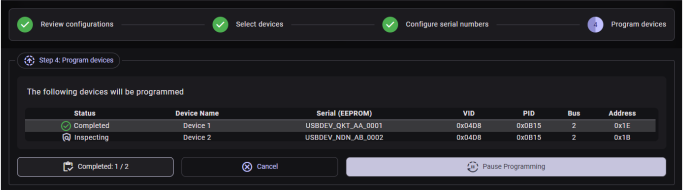
This step executes the bulk programming operation.
A table lists all target devices with their current programming status:
| Status | Description |
|---|---|
| Idle | Waiting to be programmed |
| Programming | Currently being programmed |
| Completed | Successfully programmed |
| Paused | Programming paused by the user |
| Error | An error occurred during programming |
| Canceled | Programming was canceled |
| Inspecting | The device is being inspected before programming |
| Skipped | The device was skipped |
A Completed counter card shows the number of successfully programmed devices out of the total.
| Button | Condition | Tooltip |
|---|---|---|
| Cancel | While programming or paused | “Cancel programming of remaining devices.” |
| Reset | After completion | “Start programming from the beginning.” |
| Start | Before programming begins | “Start auto-programming devices selected at Step .” |
| Restart | After cancellation | “Restart programming from the canceled device.” |
| Pause | While programming | “Halt at the device being programmed.” |
| Resume | While paused | “Resume programming from the halted device.” |
| Finished | After all devices are done | “Finished auto-programming devices selected at Step 2.” |
A progress bar is also shown in the Step 4 header while programming is active.
: If a device is password-protected
and locked, a Password Lock/Unlock Dialog appears automatically during programming,
allowing you to enter the password to unlock the device before it is programmed.
Important: Configuration changes take effect only after physically
reconnecting the device or using Reconnect Device from the Target device
menu.