
6.1 Step 1: Review Configurations
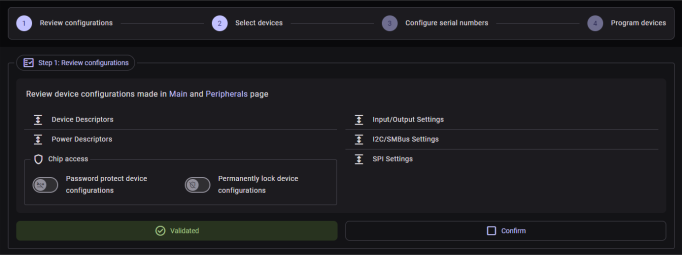
This step displays a summary of the current Main and Peripherals settings that will be applied to all target devices.
- Device configurations are shown in collapsible detail lists and tables for easy review
- Chip access options can be configured
here:
- Password protection toggle—Opens the Enable Password Dialog
- Permanently lock the device toggle—Opens the Permanent Lock Dialog
- A Validation status card shows
whether the current configuration is valid:
 Validated—The configuration is ready to apply
 Fix configuration error(s)—One or more settings have errors that must
be resolved before proceeding. Navigate to the Main
Tab and/or Peripherals Tab to correct the invalid settings,
then return to the Automation tab to continue.
Fix configuration error(s)—One or more settings have errors that must
be resolved before proceeding. Navigate to the Main
Tab and/or Peripherals Tab to correct the invalid settings,
then return to the Automation tab to continue.
- The Confirm button locks in the configuration for Step 1. It is disabled if there are validation errors or if automation is not in the Idle state.